
Summary :
A few years back, I sat in on a webinar where someone flatly said, “If you can’t code, forget about AI.” I remember writing that down and feeling a bit defeated.
Turns out that advice was wrong, or at least outdated.
By 2026, the picture has changed a lot. Companies are hiring people who know how to use AI well, not just people who can build it from scratch.
So if you’ve been searching for how to build an AI career without coding, you’re asking the right question at the right time.
This guide is for anyone starting from zero — students figuring out their first job, marketers wanting to stay relevant, freelancers looking for better-paying work, and career switchers tired of feeling left out of the AI conversation.
I’ve spent time testing no code ai career roadmap ideas myself, applying them to real projects, and watching what actually gets people hired versus what just sounds good on paper.
What you’ll get here isn’t theory. It’s a practical look at non technical AI jobs 2026 employers are genuinely posting, the tools worth your time, and high paying tech jobs without coding that don’t require a computer science background.
By the end, you’ll know exactly how to build an AI career without coding, starting with what to learn first.
Let’s walk through it together.
Is Coding Really Mandatory for AI Careers in 2026?
Short answer: not really. But let me explain why, because I used to think otherwise too.

Why the AI Industry Has Changed
Back when I first got curious about AI, most job listings wanted Python, TensorFlow, all that heavy technical stuff.
That’s shifted a lot.
Now the tools do most of the technical work themselves. What companies actually need is people who can guide these tools toward useful outcomes.
Is coding mandatory for AI in every single role? No. It depends heavily on which part of the industry you’re aiming for.
Domain Expertise vs Programming
Here’s something I noticed while helping a friend switch careers — she worked in HR for eight years and knew nothing about programming.
But she understood hiring processes inside and out.
Once she learned to use AI tools for resume screening and interview prep, she became more valuable than a junior developer who didn’t understand HR at all.
Knowing your industry deeply often beats knowing how to code, at least for a lot of AI-adjacent roles.
The Rise of Agentic AI
This part genuinely surprised me when I first tried it out.
AI agents can now handle multi-step tasks on their own, like researching a topic, drafting a summary, then scheduling a follow-up, all without someone writing a single line of code.
Someone still has to design and supervise that process though.
That’s where non-programmers step in.
Real Examples of Non-Coders Working in AI
I know a former customer support agent who now builds automated response workflows for a mid-sized e-commerce brand. No coding background at all.
I also came across a content writer who transitioned into prompt testing for a startup, purely based on her writing instincts and attention to detail.
Can I learn AI without programming and actually get hired? Based on people I’ve personally seen do it, yes.
An AI career without a computer science degree isn’t some rare exception anymore. It’s becoming fairly common, especially outside of pure engineering roles.
Top High-Paying AI Roles That Require Zero Coding
Let’s get into the roles people actually ask me about the most.
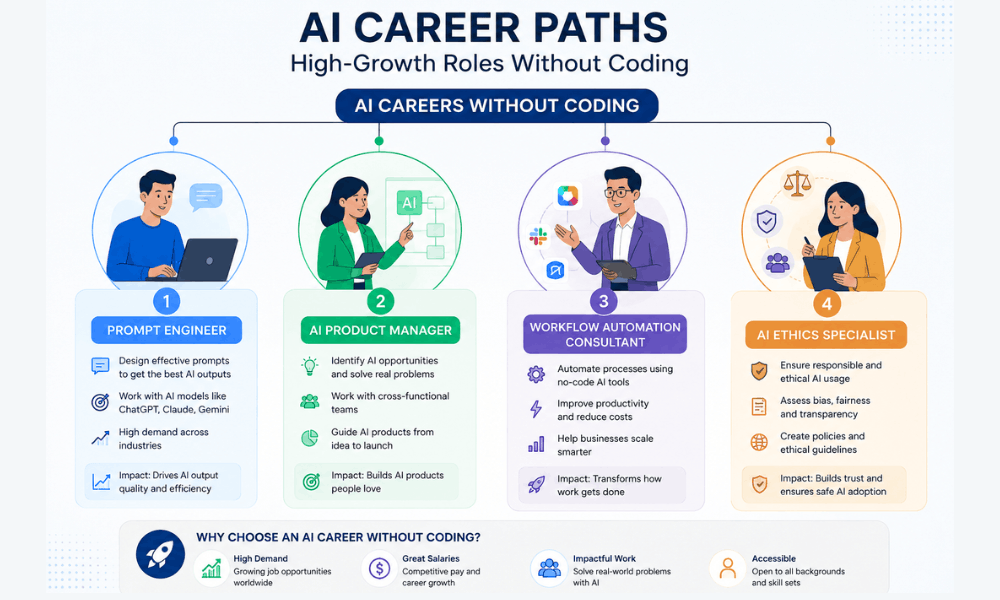
Prompt Engineer & AI Context Specialist
This one’s basically about talking to AI models in a way that gets you consistently good results.
Sounds simple, but it’s not.
I spent weeks just testing different prompt structures before I understood why some worked better than others.
A lot of people ask about prompt engineer salary without coding, and honestly it varies a ton depending on the company and your experience. Freelance rates can be surprisingly decent though, especially once you have a portfolio to show.
AI Product Manager
This role is more about direction than execution.
You’re deciding what an AI feature should actually do, working with designers and data teams, and making sure the end product solves a real problem.
The ai product manager career path usually starts in a related field first, like regular product management or business analysis, then shifts toward AI-specific products over time.
I met someone who moved into this from a background in retail merchandising. Her product instincts carried over surprisingly well.
AI Workflow Automation Consultant
This is perhaps my favorite recommendation for newcomers mostly due to the fact that you can practice using free software right away.
An ai workflow automation consultant is basically a person who integrates various apps and AI algorithms to create an automated workflow.
Imagine emails automating certain tasks, or customer questions being classified without any manual intervention.
AI Business Analyst & Operations Manager
These people use AI-driven analytics for finding patterns in their data and for assisting their teams in making better decisions faster.
It is quite common for me to see an operations manager employ this technique for reducing the duration of reports from days to hours.
AI Ethics, Governance & Compliance Specialist
As AI rules tighten across different countries, companies need people watching how these systems get used.
An ai ethics and compliance specialist checks whether AI tools are being applied fairly and legally, especially in sensitive areas like hiring or lending.
This role leans more on policy and critical thinking than technical skill, which surprises a lot of people.
No-Code AI Developer
Despite the name, this role involves actually building working apps and tools.
A no code ai developer uses visual, drag-and-drop platforms to create functional products, no traditional programming required.
I built a basic internal tool this way in an afternoon. It wasn’t perfect, but it worked, and that’s the point.
Top Non-Coding AI Roles Overview
| Role | Main Responsibilities | Skills Needed | Estimated Annual Salary | Future Demand |
|---|---|---|---|---|
| Prompt Engineer | Design and test AI prompts | Communication, pattern testing | $70,000 – $130,000 | Very High |
| AI Product Manager | Guide AI product direction | Product thinking, stakeholder management | $95,000 – $160,000 | High |
| AI Workflow Automation Consultant | Build automated business processes | Zapier, Make, n8n | $65,000 – $120,000 | High |
| AI Business Analyst / Ops Manager | Analyze data, improve efficiency | Analytics tools, business judgment | $70,000 – $115,000 | Growing |
| AI Ethics & Compliance Specialist | Ensure responsible, legal AI use | Policy knowledge, critical thinking | $80,000 – $140,000 | High |
| No-Code AI Developer | Build apps on visual platforms | Bubble, Glide, Softr | $60,000 – $110,000 | Growing |
Salary ranges shift depending on country, company size, and how much experience you’re bringing to the table. Take these as rough guides, not fixed numbers.
Essential No-Code AI Tools You Must Master
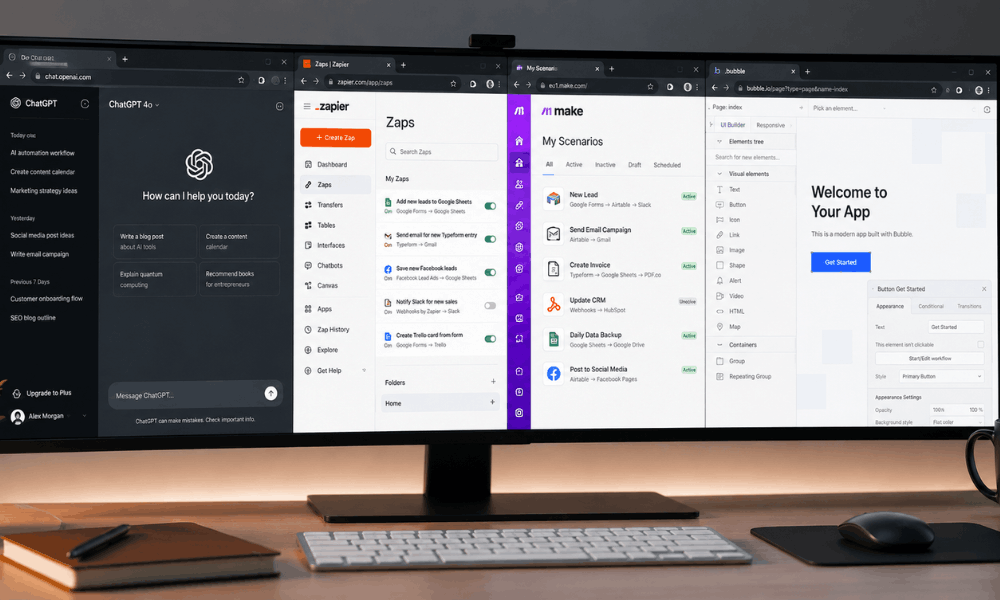
You don’t need to learn every AI tool out there. That’s a trap I fell into early on, bouncing between apps without getting good at any of them.
Better approach: pick a few, actually get comfortable, then expand.
Generative AI Platforms
ChatGPT and Claude are where most people start, and honestly, that’s fine. They’re solid for writing, brainstorming, and working through problems out loud.
Gemini and Perplexity AI are worth having too, especially Perplexity when you need quick research with sources attached instead of guessing if something’s accurate.
If your workplace runs on Microsoft, Copilot is already sitting there waiting to be used. I ignored it for months before realizing how much time it could save on routine document work.
These are the generative ai tools for non programmers that give you the fastest return on effort, in my experience.
Workflow Automation Tools
This is where things get genuinely useful.
Zapier and Make.com let you connect apps so tasks happen automatically, like a form submission triggering an email, or a new lead getting added to a spreadsheet without anyone typing it in.
These are classic no-code ai tools like Zapier and Make that most automation consultants build their entire workflow around.
n8n is a bit more technical looking, but don’t let that scare you off. Once you get past the initial setup, it’s not much harder than the others.
Together, these fall under what people now call agentic workflow automation tools, since a lot of them can trigger AI actions on their own.
No-Code AI Builders
Bubble, Glide, and Softr let you build actual working apps without touching code.
I built a simple client intake tool using Glide over a weekend. It wasn’t fancy, but it worked, and the client was genuinely impressed.
AI Productivity Tools
Notion AI and Airtable AI are less flashy but incredibly practical for daily work.
I use Airtable to track projects and pull quick insights, which is basically a light form of ai-assisted business analytics without needing a data science background.
Essential No-Code AI Tools Comparison
| Tool | Primary Use | Difficulty | Best For |
|---|---|---|---|
| ChatGPT / Claude | Writing, reasoning, brainstorming | Easy | Everyone starting out |
| Perplexity AI | Research with cited sources | Easy | Analysts, writers |
| Zapier / Make.com | Connecting apps, automating tasks | Medium | Automation consultants |
| n8n | Advanced, flexible automations | Medium-High | Non-coders comfortable with a learning curve |
| Bubble / Glide / Softr | Building functional apps | Medium | Aspiring no-code developers |
| Notion AI / Airtable AI | Organizing work, light analytics | Easy | Project and business managers |
Pick two, maybe three, from this list and actually build something with them this week. That’s worth more than reading about ten tools you’ll never touch.
Step-by-Step Roadmap to Launch Your AI Career
Alright, this is the part people usually screenshot and save, so let me lay it out clearly.
Here’s my honest take on how to build an AI career without coding, based on what I’ve watched actually work for people.

Step 1: Choose Your Niche
Don’t be all things at once. This is what I did wrong, flitting among prompt writing, automation, and product in just one week.
Pick one stream depending on what you’ve done before. If you’ve had experience in marketing, you should go for content and prompt writing. On the other hand, if you are meticulous about processes, you should pick automation consulting.
Action point: write out your past three jobs and one skill from each job that will fit an AI career path.
Step 2: Learn Prompt Engineering
This is the starting point, irrespective of which niche you choose.
Spending one whole week just trying out different prompt structures on real-world tasks that actually require getting done and not any random example from a course.
Action item: re-write five emails or documents of yours at work using AI, then work your prompts such that the output sounds natural to you.
Step 3: Build a Portfolio Without Coding
This step is more important than any certification you could earn.
Confused about how to make an AI portfolio even though you have no programming skills? List three practical examples such as an automation project you created, AI writing or an application that you made using no-code.
Action: Make a one-page summary for each example including the problem, the tool that you used and the results.
Step 4: Optimize LinkedIn
The headline should not be confined to your previous job description anymore.
Action point: Change the headline in alignment with your new path. Add at least one recent project in the experience section of your profile.
Step 5: Freelancing and Internships
Small gigs, either paid or even free pilot projects, are more credible ways to make a mark than waiting for the perfect job listing.
Next step: contact three small businesses willing to automate one task free of charge and get their testimonial in return.
Step 6: Build a Personal Brand
Being out there and sharing what you know publicly makes a bigger difference in terms of your visibility than you may think.
Task: Share something that you learned this week on LinkedIn.
Step 7: Keep Learning AI Trends
The pace here is quick, and what may be effective now could change in six months.
Action Item: Schedule 30 minutes each Friday to learn about new AI tools or updates in your chosen specialty.
This AI career guide without technology is not a silver bullet and will not just appear out of nowhere. However, if followed correctly, working out how to create an AI career without knowing how to code will become easier.
Best Free AI Certifications for Non-Coders
I’m often asked about certifications, so here is a quick guide to save you time from digging through course catalogs.
You do not need to get all of these. You can just choose the one that suits your case.
Google AI Essentials is the place to go for true beginners, who will find it easy to understand, doesn’t assume any knowledge at all and still provides a good introduction.
Google Cloud Skills Boost is a little more advanced and would suit someone who already knows the basics about AI.
The AI Fundamentals program offered by Microsoft will make sense to someone who works in an environment that is already dominated by Microsoft technologies. The principles can be easily applied to one’s everyday work.
IBM’s AI Foundations seemed to be a good choice for my friend who preferred a bit more academic approach without getting overwhelmed.
As far as marketing is concerned, the HubSpot AI course is definitely the most useful one of all courses listed here since its focus is on marketing scenarios rather than theoretical knowledge.
Also, there is a range of easy AI courses on Coursera, and it will be perfect for career changers since they can study at any time of the day.
DeepLearning.AI is also worth noting but I would recommend postponing this one till you have learned some basics first.
If you are already utilizing LinkedIn Learning for networking, then it is quite handy. Quick courses that can easily be taken during lunch time.
Honest suggestion? Complete one course entirely before moving on to another. Partial certificates on your CV will serve no purpose.
Common Mistakes Beginners Make
I’ve made a few of these myself, so consider this a shortcut past my own trial and error.
Learning Too Many Tools
Jumping between five different platforms in your first month spreads you thin. You end up knowing a little about everything and nothing well enough to actually use.
Ignoring Portfolio
Certificates look nice, but they don’t show what you can actually do. Skipping this step is probably the biggest reason people struggle when figuring out how to build an AI career without coding.
Skipping Networking
A lot of these roles come through referrals, not job boards. I landed my first freelance client through a random LinkedIn comment, not an application.
Not Practicing Daily
AI tools evolve fast, and skills fade quickly without use. Even ten minutes a day keeps you sharper than a weekend crash course once a month.
Future of Non-Coding AI Careers Beyond 2026
I’ll be honest, nobody can predict this stuff perfectly. But a few patterns seem pretty clear already.
AI agents are going to keep taking on more complex, multi-step tasks. That doesn’t mean fewer jobs, it means someone still needs to supervise and guide them properly.
Collaboration between humans and AI is gradually emerging as an integral aspect of work and no longer a distant possibility. I have been witnessing the same in my own work environment regarding reporting and client interaction.
Major organizations are investing heavily in implementing AI in their organization, and therefore, there will be increased job opportunities in this area.
At the same time, responsible AI use is getting real attention, not just lip service. Regulations are tightening in several countries already.
That’s creating steady demand for AI governance roles too, people who make sure these systems stay fair, transparent, and accountable.
Honestly, this feels like one of the more stable directions to build a career around right now.
Conclusion
If you take one thing away from everything above, let it be this: figuring out how to build an AI career without coding is genuinely doable in 2026, not some far-off idea.
You don’t need a computer science degree. You don’t need years of programming behind you.
What you actually need is a clear niche, a handful of tools you’ve practiced with, and a portfolio that shows real work, not just certificates sitting unused.
We covered a lot, from prompt engineering to automation consulting, from free certifications to the mistakes that trip most beginners up.
None of it works if it stays theoretical though.
Pick one role from this guide. Open one tool you haven’t tried yet. Build something small this week, even if it’s rough around the edges.
That’s really how to build an AI career without coding, one small project at a time, not through waiting for the perfect moment to start.
So tell me, which AI career path are you most interested in?

Frequently Asked Questions
1. Can I really get an AI job if I come from an arts or commerce background?
Yes, and I’ve seen it happen more than once. A friend with a fine arts degree now works as a prompt specialist for a small design agency.
What matters most is showing you can actually apply AI tools to solve problems in your field.
Employers care less about your degree these days and more about whether you can demonstrate real, hands-on results.
Start small. Pick something in your current industry, use AI to improve it, and document what happened.
That single project often carries more weight than any diploma sitting in a drawer.
2. Which non-coding AI role pays the highest?
From what I’ve seen, AI Product Manager and AI Ethics & Compliance roles tend to sit at the top, especially once you have a few years of experience.
Senior positions in these areas can go well past $130,000 annually, depending on the company and location.
That said, pay varies a lot. A freelance automation consultant juggling multiple clients can sometimes out-earn someone in a fixed corporate role.
Don’t chase the highest number blindly though. Pick something you’ll actually enjoy doing daily, since burnout kills momentum faster than a lower salary ever will.
3. How long does it take to learn no-code AI tools?
Honestly, quicker than most people expect.
I got comfortable with ChatGPT and basic Zapier automations within about a month of steady practice, nothing intense, just consistent daily use.
Feeling confident enough to use these tools professionally usually takes another couple of months of real project work.
The timeline shrinks a lot if you stick to one niche instead of jumping between five different tools at once.
Give yourself permission to be slow and clumsy early on. That’s just part of learning anything new, and it passes faster than you’d think.
4. Will AI tools make non-coding jobs obsolete in the future?
I get this question constantly, and the honest answer is: some tasks will disappear, but entire roles usually won’t.
AI keeps automating the repetitive stuff, which frees people up for more strategic, judgment-heavy work instead.
Someone still needs to guide these systems, check their output, and make decisions AI genuinely can’t make on its own.
The people most at risk aren’t non-coders specifically. They’re the ones who stop learning and adapting altogether.
Stay curious, keep experimenting with new tools, and you’ll likely be fine for a long while yet.
5. Is coding mandatory for an AI career?
Not for most of the roles covered in this guide, no.
Prompt engineering, product management, automation consulting, these lean far more on communication, business sense, and problem-solving than actual programming ability.
That said, having a rough understanding of how APIs or automations work under the hood definitely helps.
You don’t need to write code, but understanding roughly what’s happening behind the scenes makes you more effective at your job.
Deeply technical roles like AI research or model training are a different story though, and those usually still require solid coding skills.
6. Can a beginner learn AI without programming?
Absolutely, and honestly it’s easier now than it’s ever been.
Free tools like ChatGPT and Claude let you start experimenting immediately, no setup, no technical barrier at all.
Pair that with a beginner certification from Google or Coursera, and you’ve already got a decent foundation within a few weeks.
The trick is practicing on real tasks, not just watching tutorial videos passively.
I learned far more by messing around with actual work problems than I ever did from any course alone.
7. How to build an AI portfolio without writing code?
Document three to four projects that you have actually done before.
It could be something like automating a process, using some AI tool to write something, or making an app using no-code platforms such as Glide.
Describe for each project what was the problem, which tools were involved and what was the actual outcome of the project.
A short description would do fine, it can fit in one page or a basic Notion document.
Employers need to know your thoughts and the actual results of your projects, not nice designs.
8. What are the best free AI certification courses for non-coders?
Google’s AI Essentials is a solid starting point if you’re brand new to all this.
HubSpot’s AI course works well specifically for marketers, since it’s built around real marketing scenarios rather than abstract theory.
Microsoft’s AI Fundamentals makes sense if your workplace already runs on Microsoft tools day to day.
Coursera offers flexible beginner options too, good for people juggling a full-time job while learning.
Pick just one, finish it properly, then move on. Half-finished courses on a resume rarely impress anyone.