
A few years ago, I sat in a team meeting where someone casually said, “AI is going to replace half the jobs in this room.” I remember the silence. I also remember thinking — okay, but which half, and can I choose to not be in it?
That question is exactly why I started digging into what an ai career roadmap for non technical professionals actually looks like in practice, not in theory. If you’ve been Googling “how do I get into AI without learning Python,” you’re not alone, and you’re not late either.
This guide is for marketers, HR folks, customer support leads, finance analysts, teachers, project managers — basically anyone who doesn’t write code but doesn’t want to be left behind.
By the end, you’ll know exactly what a realistic no-code AI career looks like, which jobs are actually hiring right now, and the five steps I’d personally follow if I were starting from zero in 2026.
Why Non-Technical Professionals Need an AI Roadmap in 2026?
Here’s something I didn’t expect when I first started exploring this space: most companies aren’t short on engineers. They’re short on people who understand both AI and the actual business problem it needs to solve.
That gap is exactly where the demand for non-tech AI skills 2026 is exploding. Every AI Product Manager I’ve spoken with says the same thing — they need people who can translate between “what the model can do” and “what the customer actually needs.” That’s not a coding skill. That’s a judgment skill.
If you’re building a future-proof career with AI, the goal isn’t to compete with engineers. It’s to become the person who makes their work usable, ethical, and profitable.
That’s an AI career path for non-coders in 2026 that’s growing faster than most people realize.
Why AI Literacy Matters More Than Coding
Based on my experience talking to hiring managers, the interview question has quietly changed. It used to be “do you know SQL?” Now it’s “have you used AI tools to solve a real problem in your last role?”
AI literacy means you understand how large language models work at a conceptual level, what they’re good at, where they fail, and how to prompt them effectively.
You don’t need to build a model. You need to know how to use one well and explain its output to a non-technical stakeholder. That single skill is more valuable than most people assume.
Why Domain Expertise + AI Beats Coding Alone
One mistake I personally made early on was assuming I needed to “become technical” to stay relevant. I was wrong.
A finance professional who understands AI-powered forecasting will always beat a generalist coder who doesn’t understand finance.
A marketer who knows how to build AI content workflows will outperform a developer who’s never run a campaign.
Your existing domain expertise, paired with AI skills for non-technical professionals, is your actual competitive advantage — not a weakness to fix.
Top Non-Technical AI Jobs Hiring in 2026
Let’s get specific, because vague career advice helps nobody. These are the roles I’ve actually seen popping up again and again on job boards and LinkedIn posts this year.
Some of them didn’t even exist as job titles three years ago. That alone tells you how fast this space is moving.
AI Product Manager You’re the person deciding what an AI feature should actually do, not how it’s coded underneath. Responsibilities include gathering user feedback, working with engineers, and deciding what “good” looks like for an AI feature.
Salary potential here is honestly the strongest on this list. Companies know one bad AI product decision can cost millions, so they pay to avoid that risk.
Future demand looks strong too, mainly because most companies still don’t have anyone dedicated to this. It’s the kind of gap that takes years to fill properly.
Who should apply? Anyone with a product, business, or strategy background who’s comfortable asking “why” a lot. Growth here is fast — a lot of people move into senior or director-level AI product roles within two to three years.
AI Operations Specialist This role is basically the glue between AI tools and the people using them every day. You’ll be rolling out new tools, fixing broken workflows, and training teams that don’t yet trust AI outputs.
I’d call this the most underrated role on this whole list. Nobody talks about it much, but almost every mid-size company needs one and can’t find one.
Salary here sits comfortably mid-to-high range, and demand keeps climbing as more teams adopt AI tools internally. It suits people who already enjoy fixing processes, not just talking about them.
If you’re the person on your team who always says “there’s a faster way to do this,” you’ll like this role. Growth path usually leads toward AI transformation or automation leadership positions.
AI Governance and Ethics Analyst As regulation tightens across regions, someone has to make sure AI use inside a company doesn’t create legal or reputational trouble. You’ll review how AI tools are used, flag risky practices, and write policy that non-technical teams can actually follow.
This one surprised me — the pay is higher than most people expect for a “non-technical” title. Demand is rising fast, especially in finance, healthcare, and any regulated industry.
People with a legal, compliance, HR, or policy background tend to move into this role naturally. Growth opportunities are strong since almost no company has this fully staffed yet.
Non-Technical Prompt Engineer Despite the name, there’s no coding involved here at all. Your job is crafting, testing, and refining prompts until AI tools produce consistent, usable results for a specific business need.
I’ll be honest, this title confuses people at first. Once you explain it as “writing clear instructions for AI so it stops giving wrong answers,” it clicks immediately.
Pay varies a lot depending on industry, but it’s a solid entry point if you’re just starting out. Anyone who’s naturally detail-oriented and patient with trial and error should consider this one.
Growth usually moves toward AI operations or AI strategy roles once you’ve built a track record.
Generative AI Content Strategist You design how a team uses AI for writing, design, or campaigns, while keeping quality and brand voice intact. After testing a handful of AI tools across different content workflows myself, I’ll say this — this role is one of the busiest right now.
Salary potential is decent and climbing, especially at companies scaling content production without scaling headcount. Demand is high in marketing agencies, media companies, and any brand publishing content daily.
Marketers, writers, and editors fit here best. Growth often leads into broader AI marketing leadership roles within a couple of years.

Here’s a simple breakdown of all five roles side by side:
| Job Title | Core Responsibility | Key Skills Required |
|---|---|---|
| AI Product Manager | Define what AI features should do and why | Product strategy, stakeholder communication, AI literacy |
| AI Operations Specialist | Deploy, monitor, and troubleshoot AI tools across teams | Workflow design, tool integration, problem-solving |
| AI Governance & Ethics Analyst | Keep AI use compliant, fair, and low-risk | Policy knowledge, risk assessment, clear communication |
| Non-Technical Prompt Engineer | Design and refine prompts for reliable AI output | Prompt design, patience, domain knowledge |
| Generative AI Content Strategist | Build AI-assisted content and SEO workflows | Content strategy, SEO basics, AI tool fluency |
None of these roles ask you to touch a single line of code. That’s really the whole point of this ai career roadmap for non technical professionals — pick a lane, not a language.
The 5-Step AI Career Roadmap for Non-Technical Professionals (2026 Edition)
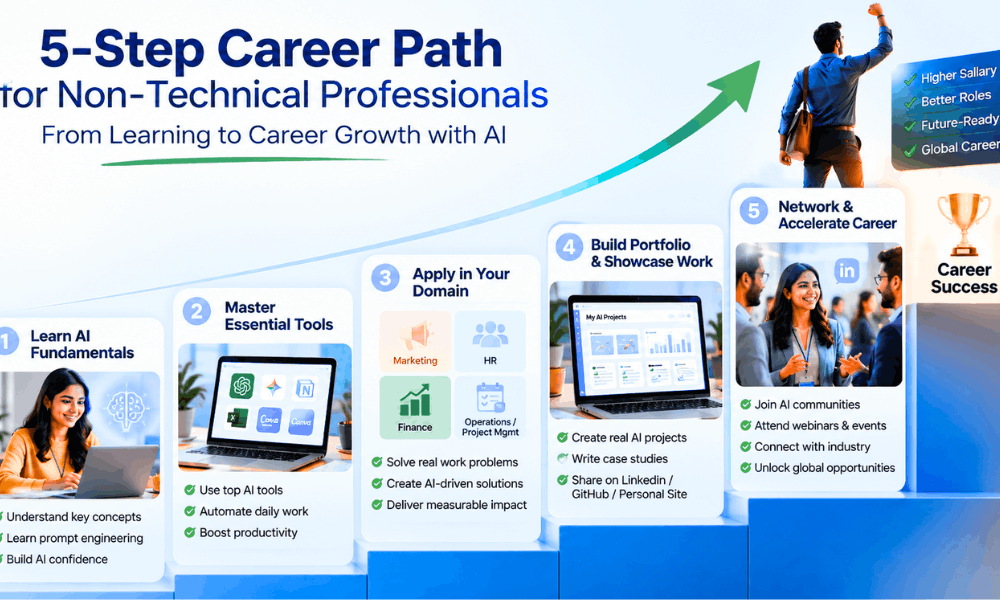
This is the step-by-step AI roadmap for non-programmers that I’d actually follow if I were starting from scratch today. Not the theory version. The version built from watching what actually gets people hired.
I broke it into five steps because that’s genuinely how it happened for me and for most people I’ve talked to. Skip a step and you’ll feel it later, usually right around interview time.
If you only remember one thing from this whole non-technical AI career roadmap, let it be this — order matters more than speed.
Step 1: Build Foundational AI Literacy
Before touching a single tool, spend time on the basics. Learn AI fundamentals in plain, boring language — no jargon, no hype.
You need to understand what a large language model actually is. Generative AI basics for beginners means knowing why a model sometimes makes things up confidently, and why that’s not a bug you can just ignore.
LLM basics like “context window” or “hallucination” will come up constantly in job interviews. You don’t need math for any of this. You need mental models you can explain to your grandmother.
Give yourself two focused weeks here. Rushing this step is the mistake I see most often.
Step 2: Master No-Code AI Tools & Prompt Engineering
This is where things start clicking for most people, honestly. Prompt Engineering for non-technical background folks isn’t about memorizing magic phrases you saw on Twitter.
It’s closer to learning how to brief a very smart, very literal new hire. The clearer you are, the better the output. That’s basically the whole skill.
One mistake I personally made early on was trying every tool at once. What worked much better the second time around was picking two or three tools and actually living inside them for a few weeks.
Generative AI workflow automation stops feeling abstract once you connect two tools together and watch a task finish itself. That’s usually the moment people stop being scared of AI and start relying on it daily.
Here are the tool categories worth knowing, roughly grouped by what they’re good for:
- General reasoning and writing — ChatGPT Plus, Claude, Gemini.
- Research and fact-checking — Perplexity, NotebookLM .
- Organizing work and data — Notion AI, Airtable AI.
- Design and visual content — Midjourney, Canva AI, Gamma.
- Connecting apps and automating tasks — Zapier, Make.
- Everyday office work — Microsoft Copilot, Google AI Workspace.
| Domain | Recommended Tools | Use Case |
|---|---|---|
| General AI Assistant | ChatGPT Plus, Claude, Gemini | Research, writing, reasoning, analysis |
| Research & Search | Perplexity, NotebookLM | Fact-checking, source-grounded research |
| Productivity & Notes | Notion AI, Airtable AI | Organizing projects, databases, summaries |
| Design & Visuals | Midjourney, Canva AI, Gamma | Graphics, presentations, visual storytelling |
| Automation | Zapier, Make | Connecting apps into automated workflows |
| Enterprise Workspace | Microsoft Copilot, Google AI Workspace | Documents, spreadsheets, email drafting |
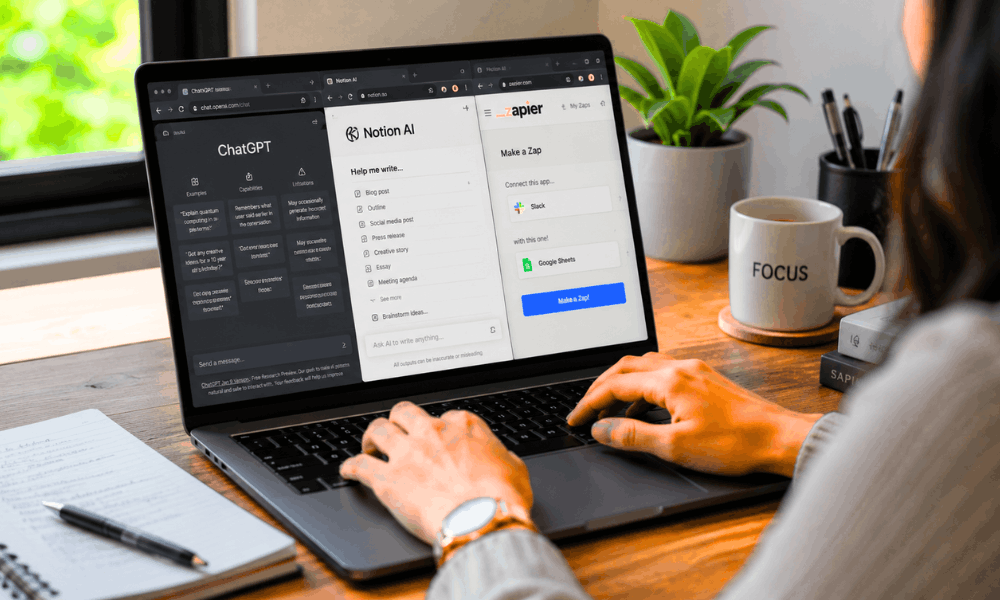
Human-AI collaboration skills aren’t taught in a course, not really. They come from repetition — using these tools on messy, real tasks instead of clean tutorial examples.
Step 3: Apply AI To Your Current Domain
Don’t wait for a new job title to start using AI. Apply it right where you’re already sitting.
AI in marketing might look like automating first drafts of campaign briefs. AI in HR could mean summarizing stacks of candidate feedback in minutes instead of hours.
AI in finance often shows up as faster variance reports or cleaner forecasting drafts. AI in sales, AI in customer support, and AI in operations all follow roughly the same pattern.
Find the repetitive, judgment-light task nobody enjoys doing, and let AI handle the first pass. You review, you edit, you approve. That’s the workflow.
If I were starting again in 2026, I’d spend one full month just automating small pieces of my current job before applying anywhere new. It builds real proof, not just a line on a resume.
Step 4: Build A Real Portfolio Without Coding
You don’t need GitHub to prove any of this.
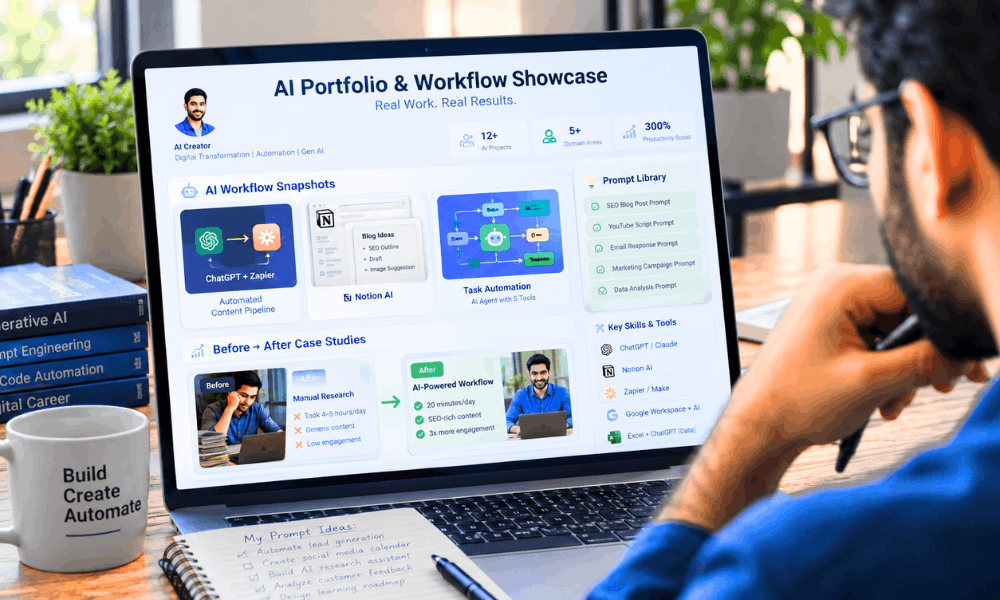
Non-tech AI portfolio project examples can be as simple as an AI workflow you built for your own team. A prompt library you refined over a few months counts too, especially if you can show it improving over time.
A short case study portfolio works even better — pick one project, show the before, show the after, explain what you changed and why. Screenshots and honest process notes matter more than polish here.
Recruiters skim a lot of applications. What stops them is proof of thinking, not proof of design skills.
Step 5: Network & Apply For AI-Centric Roles
LinkedIn optimization for AI jobs starts small — put your AI-related work in your headline instead of burying it in paragraph three.
Join AI communities relevant to your actual industry, not just generic AI groups. Comment on real discussions, ask genuine questions, share what you’re learning even if it feels basic.
This kind of AI networking builds visibility faster than quietly applying to fifty jobs a week ever will.
For your resume, a few honest AI resume tips — translate your AI work into outcomes. Time saved, errors reduced, revenue influenced. Numbers get read. Vague bullet points get skipped.
This five-step ai career roadmap for non technical professionals isn’t complicated on purpose. It’s slow by design, because skills that stick are usually built slowly, not rushed.
Common Myths About AI Careers (Debunked)
There’s a lot of noise out there about AI career myths, and honestly, most of it comes from people who’ve never actually applied for one of these roles.
Let me clear up the three I hear most often, because they stop good people from even trying.
Myth 1: You need Python to work in AI. Do I need Python for AI? For most roles, no.
I get asked this constantly, and every time I check job listings for product, operations, or governance roles, coding rarely shows up as a requirement. Those roles want judgment, communication, and an understanding of how AI fits into real business problems.
Coding matters if you’re building the model itself. It matters a lot less if you’re deciding how the model should be used.
Myth 2: AI will replace all non-technical jobs anyway, so why bother learning it? This one bothers me a bit, honestly, because I’ve watched it play out the opposite way.
The people I’ve seen struggle aren’t the ones using AI daily. They’re the ones who ignored it for two years and then panicked when it showed up in their performance review.
Learning early isn’t about beating AI. It’s about deciding how you work alongside it before someone else decides for you.
Myth 3: AI jobs without coding pay less than technical roles. Not from what I’ve seen, at least not across the roles we covered earlier in this guide.
Governance analysts, product managers, and operations specialists often get paid well because companies genuinely can’t find enough people who can do both — understand AI and understand the business. Scarcity drives pay, and right now, that specific mix of skills is scarce.
If you take one thing from this section, let it be this — these myths mostly survive because nobody bothers checking real job postings before repeating them.
Recommended Free & Paid AI Courses (2026)
People ask me for a list of best AI courses for non-technical professionals more than almost anything else, so let’s actually go through it properly.
After sitting through several of these myself, some good, some genuinely a waste of a weekend, here’s what I’d recommend without hesitation.
If you want to learn AI free 2026 style, without spending a rupee before you’re even sure this path is for you, there are solid options.
Google AI Essentials is where I’d send a total beginner. It doesn’t assume any background and explains AI concepts the way you’d explain them to a colleague, not a computer science student.
DeepLearning.AI on Coursera goes a level deeper into generative AI concepts. You can audit it for free, and honestly, the free version alone is enough for most non-technical learners.
Microsoft AI Skills is worth it purely because it ties learning directly to tools like Copilot that you’re probably already using at work.
LinkedIn Learning courses on prompt engineering are short and practical, which matters when you’re squeezing learning into a lunch break.
IBM SkillsBuild covers AI literacy and ethics in a way that’s genuinely free and surprisingly well structured for something with no price tag attached.
HubSpot Academy is my pick if you’re in marketing specifically. It’s free, focused, and doesn’t waste your time on filler content.
OpenAI Academy, where available, is worth checking too, mainly for staying current on how the tools you already use are evolving.
| Course Name & Platform | Focus Area | Price |
|---|---|---|
| Google AI Essentials | AI fundamentals for beginners | Free / Low-cost |
| DeepLearning.AI (Coursera) | Generative AI concepts, no-code focus | Free audit / Paid certificate |
| Microsoft AI Skills | AI in productivity tools, Copilot | Free |
| LinkedIn Learning | Prompt engineering, AI for business | Subscription |
| IBM SkillsBuild | AI literacy and ethics | Free |
| HubSpot Academy | AI in marketing and content | Free |
| OpenAI Academy | Staying current on OpenAI tools | Free (where available) |
Start with one free course before paying for anything. Most people quit paid courses halfway through anyway — a free one lets you test your own commitment first, before you spend money proving it.
AI Trends Every Non-Technical Professional Should Watch in 2026
This era of the AI-first workplace is already here. The following trends are particularly noteworthy:
Both AI Agents and Agentic AI have moved from the one-response format to more advanced solutions that are capable of performing a chain of tasks automatically, thus affecting workflow design in the process.
AI Copilots are being integrated into software products and services, so basic AI literacy becomes a prerequisite, not an additional skill set.
The combination of Multimodal AI, AI Governance, and AI Security Awareness is on its way to coming together as companies will need individuals who know not only what AI can be capable of but what AI should not be doing without some form of oversight.
AI Workflow Automation and Enterprise AI are making sure that while your job title in 2026 may remain unchanged, your role within that job is moving towards collaboration with AI without you even realizing it.
Being responsible with AI is becoming a requirement when being hired, particularly for regulated businesses.
Biggest Mistakes Beginners Make While Starting AI Careers
Too much juggling of tools simultaneously – This will dilute your attention and you will not be an expert in anything. Focus on 2-3 tools only.
Neglecting practical projects – It is no use watching tutorials without implementing anything. You get theoretical knowledge which will not make it to your resume.
Neglecting your LinkedIn profile – Recruiters look for certain keywords related to AI in their searches. If you do not have any on your profile, you are practically invisible.
Copying prompts without understanding them — This creates a shallow skill set that falls apart the moment you need to solve something unfamiliar.
Having no portfolio — Claims without proof rarely convert into interviews.
Having no niche — Trying to be generically “good at AI” is weaker than being known as the AI-in-HR person or the AI-in-finance person.
The fix for all six is the same: pick a domain, go deep, and document your work consistently.
Final Thoughts
If there’s one thing I’d want you to walk away with, it’s this — the future belongs to professionals who know how to work with AI, not just the ones trying to build it.
I didn’t believe that fully when I started either. It took actually using these tools for months before it stopped feeling like a trend and started feeling like just… how work gets done now.
You don’t need to become an engineer. Nobody’s asking you to.
You need to become fluent, a little curious, and consistent enough that AI stops feeling like a novelty and starts feeling like a normal part of your Tuesday.
This ai career roadmap for non technical professionals only works if you actually move through it, not just read it and bookmark the page.
Pick one tool from Step 2. Use it on one real task this week, something you’d normally dread doing.
That’s it. That’s the whole starting point.
If you’re serious about this, here’s your next move — go build that ai career roadmap for non technical professionals into your actual calendar, not your someday list.
Block thirty minutes tomorrow. Open a tool. Try something messy and imperfect.
Start now, not when it feels ready. Honestly, it rarely does — and the people who move anyway are usually the ones who end up ahead.

Frequently Asked Questions
1. Can I switch to AI without a computer science degree?
Yes, and honestly, most people I’ve seen make this switch didn’t have one.
What actually matters is domain expertise plus applied AI skills. A marketer who knows AI tools well is more hireable than a generic CS grad with no business context.
Hiring managers care about outcomes now, not credentials. Show them a project you built or a workflow you improved, and the degree question mostly disappears.
2. Is coding mandatory for an AI career in 2026?
No, not for most positions discussed in this guide.
This is an important skill for people developing models or refining existing ones themselves. For individuals who make decisions about applying artificial intelligence within companies or governing its usage, coding is not nearly as crucial.
Product management, operations, governance, content strategy – none of these require you to code a thing. I should know, since I’ve checked multiple job descriptions before writing this.
3. How can a non-technical person learn Generative AI?
Start with the basics, not the tools. Understand what a model actually does before you start prompting it randomly.
Then move into hands-on practice with tools like ChatGPT, Claude, or Gemini on real tasks from your actual job, not sample exercises from a course.
Consistency beats intensity here. Twenty minutes a day for a month teaches you more than one long weekend of cramming ever will.
4. How long does it take for a non-technical professional to learn AI?
Most people reach a functional, job-ready level somewhere between three and six months of steady, focused practice.
That’s not mastery, to be clear. That’s “comfortable enough to use it daily and talk about it confidently in an interview.”
Deeper expertise keeps building after that, honestly, the same way any skill does. It just doesn’t stop at six months.
5. What are the top non-coding AI jobs in 2026?
I see these roles popping up again and again: AI Product Manager, AI Operations Specialist, AI Governance and Ethics Analyst, Non-technical Prompt Engineer, and Generative AI Content Strategist.
There is one role for each type of candidate, and that, to me, is the most exciting thing about this whole thing.
6. What is the highest paying non-technical AI job in 2026?
From what I’ve seen, AI Product Manager roles tend to sit at the top of this list.
That’s mostly because the role carries real business risk and decision-making weight, not just execution. Companies pay for people who can be trusted with that kind of responsibility.