
Overview
AI technology is progressing rapidly, and to be honest, the development process today differs significantly even compared to that of just one year ago.
In 2026, the major innovation is the introduction of the Agentic AI workflows, which entails the use of several AI agents rather than one universal tool.
This is something I’ve personally tried out, and the results are astounding when you shift from one chatbot to an organized team of AI bots.
In case you are automating any process such as content creation, research, and business functions, chances are that you’ve hit a dead end.
That’s where things start getting interesting, because learning How to create a multi-agent system using free open-source tools can completely change how you approach productivity.
Rather than making one artificial intelligence do all the work, you will distribute the work in smaller chunks to various agents.
This reminds me of putting together my own digital workforce, in which each agent will have its own responsibilities.
These days, many individuals are gravitating towards AI automation pipelines, AI agents working together, and even decentralized AI in order to get results quickly.
I saw this happen personally during my experience with technologies such as CrewAI and LangGraph, especially when used alongside local models.
On paper, this may seem complicated. In reality, however, it is quite simple once you know how it all works.
And that’s why so many developers and creators are now searching for How to create a multi-agent system using free open-source tools, because it gives you control, flexibility, and zero ongoing cost.
And this is the actual question that you must ask yourself:
How will your everyday activities be performed autonomously using a set of AI assistants that you created from scratch?
This is precisely the topic that we will look at in detail.
What is a Multi-Agent System?
Simple Explanation (with Example)
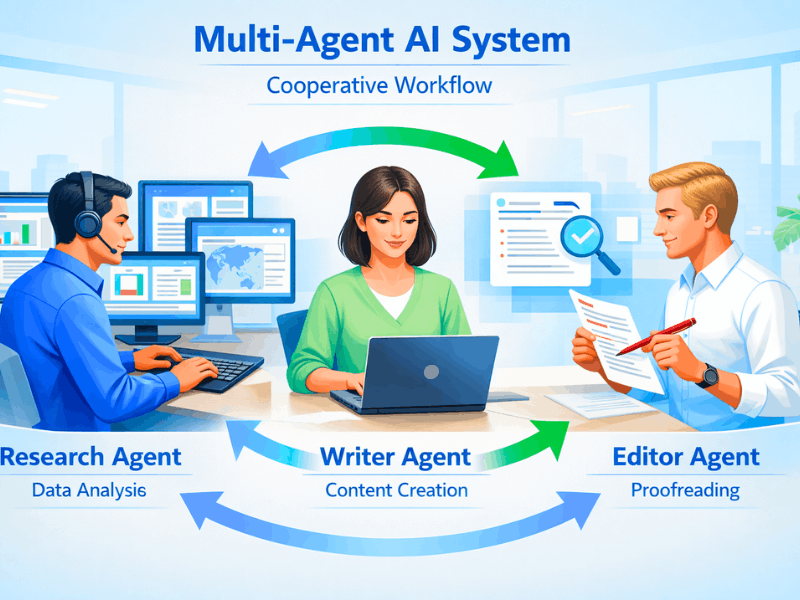
Multi-agent systems can be viewed as groups of artificial intelligence agents that work together as a team rather than using just one technology that does everything by itself.
The reason why this system works well is because each of the agents involved in this process performs their unique function.
For me, I can describe it in terms of hiring three people instead of just one.
For instance, during my tests, I configured an ensemble that could perform the following tasks:
The first agent would gather information, while the second one would write an article based on that information.
Finally, the third agent would edit and refine the material.
If you’re learning How to create a multi-agent system using free open-source tools, this is the core idea you need to understand first.
It is not a matter of creating one intelligent AI, but rather creating a system that works in cooperation and task delegation amongst agents.
Here lies the true strength of the concept in action.
Why It’s Important in 2026
By the year 2026, there won’t be any need for standalone AI applications since there will be interconnected systems capable of managing complex workflows independently.
That is where Agentic AI workflow 2026 comes in due to the growing size and complexity of jobs.
It has been observed that using individual AI systems for research, analysis, and results generation proves challenging.
But the process becomes more systematic when it is assigned to various agents working together.
hat’s why people are now focusing on AI agent collaboration, autonomous AI agents for productivity, and even low-code multi-agent system tools.
If you understand How to create a multi-agent system using free open-source tools, you’re basically learning how to build scalable AI systems that can grow with your needs.
This model is now becoming the norm, particularly for automation, business processes, and AI development.
Why Use Free Open-Source Tools?
Benefits (Self-Hosted AI Agents, Privacy)
Control was one of the primary motivators for me when shifting toward open source technology.
With self-hosted AI agents, you don’t have to worry about sending your data to an external API; rather, it will remain on your server.
This is of great significance for projects that involve sensitive information.
I have used both cloud services and the local version, and to be honest, using a local agent such as the one on Ollama just seems to be far more secure and flexible.
You can modify behavior without any limitations.
If you’re serious about learning How to create a multi-agent system using free open-source tools, this level of control becomes a huge advantage.
This will also allow building reliable systems that would not rely on a specific corporation in case of using modern AI solutions.
Cost + Flexibility
However, one should note that API cost can become extremely high when working with several agents at the same time.
That is why I am personally a fan of open-source solutions, which, after installation, require no additional money from me.
I can use endless workflows without limitations and unexpected costs at the end of the month.
As I began exploring AI automation workflows, I realized that it can be quite expensive if all you have is a paid approach.
The open source way enables you to be flexible with the entire process of construction, modification, and scaling.
This is what has led to a new wave of interest in low-code multi-agent systems together with local models.
If you’re exploring How to create a multi-agent system using free open-source tools, this freedom to experiment without cost pressure makes a huge difference in learning and building better systems.
Best Open-Source Frameworks for Agentic AI in 2026
People often believe there is always one definitive winner when comparing CrewAI vs. AutoGen vs. LangGraph, but real-world applications don’t work this way.
They all operate under entirely different assumptions about how agents can function. I found out just how different they can be from firsthand experience during my test.
They may revolve around roles, dialogues, or workflow processes.
If you’re exploring How to create a multi-agent system using free open-source tools, choosing the right framework can save you weeks of frustration.
Let me break them down honestly based on real usage experience.
CrewAI
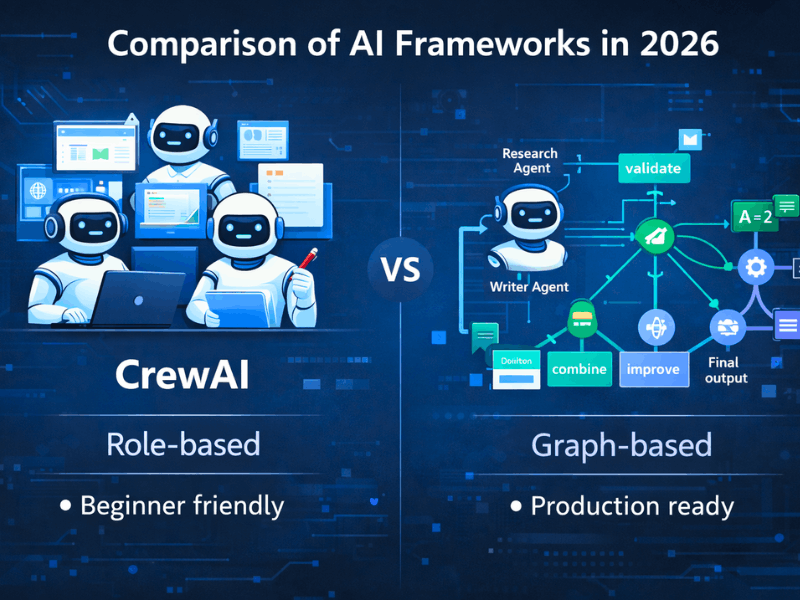
CrewAI would be the most suitable option to begin your journey with multi-agent systems.
This technology uses a role-based system, where you have to create your agents in the form of individuals having certain duties.
For instance, I created a basic content pipeline using CrewAI within a couple of hours by creating agents such as researchers, writers, and editors.
This is precisely why it is used by many programmers for rapid prototyping and experimentation.
If your goal is to quickly understand How to create a multi-agent system using free open-source tools, CrewAI gives you the smoothest entry point.
However, based on my experience, when workflows become more complicated, you will start to feel some limitations.
AutoGen
This contrasts greatly from AutoGen since it relies on conversation for agent collaboration.
Instead of having defined functions, the agents discuss among themselves as individuals do when debating about a topic.
When I tried it out in my research project, it seemed to be extremely natural as if a team was working on the brainstorming process.
Therefore, AutoGen can be used in applications where interaction or decision-making is required.
Unfortunately, it seems that AutoGen is going into maintenance phase due to new priorities of Microsoft.
Still, if you want to understand conversational AI agents while learning How to create a multi-agent system using free open-source tools, it’s worth experimenting with.
LangGraph
This is where LangGraph comes into play.
It makes use of a graph-based state management system where workflows are represented as nodes connected to each other.
On the surface, it might seem a bit complex, but when you get the hang of it, you’ll see just how potent it really is.
You can create highly advanced workflow processes, track agent states, and develop industrial-strength software architecture frameworks.
This is precisely what makes LangGraph a recommended choice for industrial applications.
If you’re serious about mastering How to create a multi-agent system using free open-source tools, LangGraph is the tool that will take you beyond beginner level and into real-world systems.
Step-by-Step: How to Create a Multi-Agent System Using Free Open-Source Tools
At this point, you should be ready to get into the actual building part.
I’ll walk you through exactly How to create a multi-agent system using free open-source tools based on what I’ve personally tested.
It’s not just theory, but a method that I have employed myself in order to create basic AI-driven automation processes on my computer.
Start off small before you go big.
Step 1: Define Your Agent Roles
Before getting into any coding, you should know exactly what each agent does.
It is at this stage where most novices fail as they try to assign every task to one agent.
You should split your task into smaller pieces.
For instance, when I was creating my own, I used:
- Research Agent → collects information
- Writer Agent → creates content
- Editor Agent → improves output
The structure gives you an organized feeling right from the start.
If you’re learning How to create a multi-agent system using free open-source tools, think like a manager building a team, not a coder building a script.
Well-defined roles make debugging easier and ensure consistent results.
Step 2: Choose Framework (CrewAI / LangGraph)
It’s now up to you to define the interaction between the two.
For speed and simplicity, use CrewAI.
If you have time and the need for control and scalability, LangGraph would be more suitable.
From personal experience, however:
- CrewAI is great for beginners
- LangGraph is better for structured workflows
Initially, I selected CrewAI to learn how the agents interact.
I later switched to LangGraph for more state control and workflow manipulation.
While learning How to create a multi-agent system using free open-source tools, don’t overthink this step.
Pick one framework, build something small, and improve later.
Step 3: Setup Environment (Python + Ollama)
Now comes the setup part, and honestly, it’s easier than it sounds.
You only need a few things to get started:
- Python installed on your system
- Pip for package management
- Ollama for running local models
Then install your framework:
- crewai or langgraph
The first time I set up this project, it took me less than an hour.
After installation, you pretty much have your own personal AI environment up and running.
Here comes the magic part, because you are now independent of third-party APIs.
If you’re serious about How to create a multi-agent system using free open-source tools, this local setup gives you full control and flexibility to experiment freely.

Step 4: Integrate Local LLM (Ollama)
This is the stage where your agents receive information.
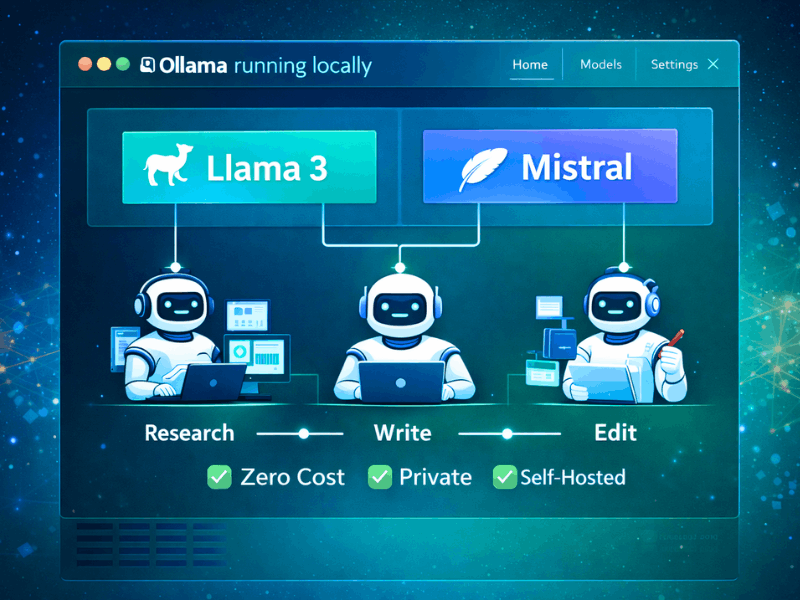
With Ollama, you could implement models such as:
- Llama 3
- Mistral
Personally, I recommend Llama 3 for various purposes due to its optimal output balance.
Ollama makes the implementation process easy; all that needs to be done is hooking your framework to the local model endpoint.
The agents will then be able to generate answers without having to incur API costs.
This is what I like most about this platform because of the self-hosted agents that require no dependencies.
When learning How to create a multi-agent system using free open-source tools, this step is what turns your setup from basic structure into a working system.
Step 5: Build Workflow (Agentic AI Workflow)
Everything now fits into place.
Your agents get connected in an appropriate process where tasks are carried out in sequence.
Here is a basic illustration that I have always used:
- Research agent gathers data .
- Writer agent generates content .
- Editor agent refines output.
Each agent forwards the output to the next agent.
This sets up an efficient flow of AI agent cooperation, which is the fundamental concept of Agentic AI.
Seeing this work in action gave me the impression of watching a mini-team act automatically.
At this point, you’ve fully understood How to create a multi-agent system using free open-source tools, and you can start experimenting with more complex workflows, automation tasks, and scalable AI systems.
How to Integrate Local LLMs (Ollama) with Multi-Agent Systems
Setup Ollama
Installation of Ollama is surprisingly easy, and I did not think that would be the case initially.
It’s simply a matter of installing it to your computer and executing a single command line to have your local AI server running.
To my amazement, it was very effortless compared to what one would go through when handling API keys and cloud configurations.
After installation, the model is accessed directly, and it runs on your system without any connection to the internet required.
This is when the fun begins, as your multi-agent system has now acquired its very own brain!
If you’re exploring How to create a multi-agent system using free open-source tools, this step gives you full control over how your agents think and respond.
It also fits perfectly into self-hosted AI agents and decentralized AI systems, which are becoming more common now.
Use Llama 3 / Mistral Locally
Setting up, the following is the stage when it comes to selecting the model.
In my own experience, I have tried both Llama 3 and Mistral, and their advantages differ according to requirements.
As far as versatility is concerned, Llama 3 seems better because of its well-rounded nature, whereas Mistral is quicker and suits lightweight tasks.
What makes them even better is that you can easily shift from one model to another without disturbing your entire system.
The request made by your agents to the local model will get answered immediately and at zero cost to you.
When you understand How to create a multi-agent system using free open-source tools, using local LLMs becomes a game changer for building efficient AI automation workflows.
This will make your system more resilient because you won’t rely on any outside services that can affect performance.
Scalable Multi-Agent Architecture for Beginners
Everything starts out simple when creating MAS, but scalability becomes essential very soon.
This is what I found after my first workflow began to malfunction when tasks became a bit more complicated.
Knowing the structure from the outset will help in the future.
Basic Architecture
Most straightforward multiagent systems tend to have a linear flow, and it helps significantly if the flow is kept straightforward.
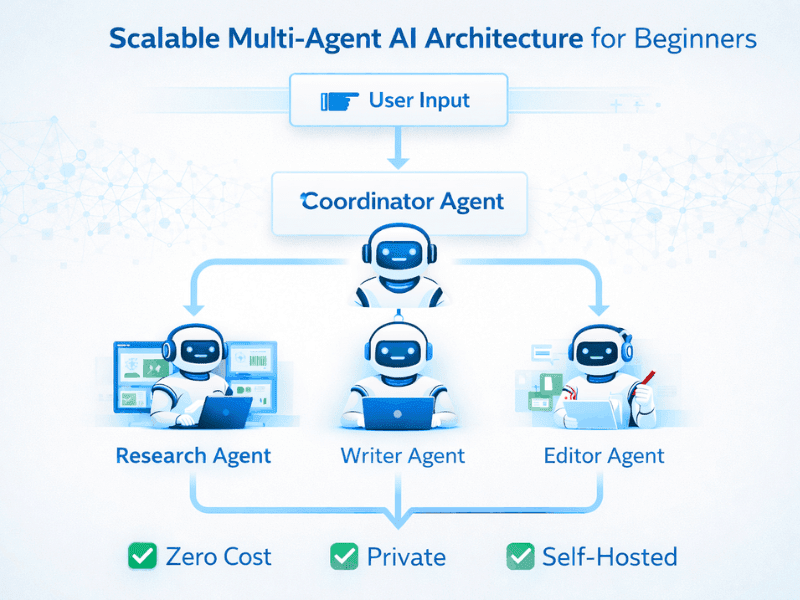
The architecture that I use in my system resembles this diagram:
- User input
- Coordinator agent
- Worker agents
- Final output
The coordinator functions like a manager, allocating jobs to others and receiving their output.
Every worker agent performs its own task, making the process more streamlined and easier to debug.
When you’re learning How to create a multi-agent system using free open-source tools, this kind of basic architecture helps you avoid confusion early on.
It also improves AI agent collaboration, because every agent knows exactly what it’s supposed to do.
Scaling Tips
After your system begins to function, the task of scaling without destroying everything follows.
I have committed the error of increasing the number of agents too quickly.
It would be better to enhance the structural design gradually.
Here are a few practical tips:
- Keep the agents modular and autonomous.
- Introduce memory or contextual information incrementally.
- Employ systematic workflow rather than randomness.
If you’re serious about How to create a multi-agent system using free open-source tools, think long term from the beginning.
Scalability does not imply agent proliferation; it refers to increasing efficiency through intelligence.
Use Cases: Autonomous AI Agents for Productivity
It’s not until after you have implemented your own multi-agent system that things become interesting.
It wasn’t until I actually applied it to my own daily activities that I really understood its value; it literally saved me hours of work.
One of the most useful applications of multi-agent systems is for content generation where separate agents are responsible for research, writing, and editing.
I tried it out for blogging, and I found the process to be very intuitive, almost as if there were a content team working behind the scenes.
Research assistants represent another powerful use case, particularly when it comes to gathering large volumes of data.
Rather than doing the grunt work yourself, an assistant gathers the data, and another distills it into useful conclusions.
This is where AI agent collaboration really shines because each part of the process becomes faster and more structured.
Even in business processes, things become much more exciting.
Tasks like creating emails, generating reports, and even decision-support systems could be automated through coordinated agents.
If you understand How to create a multi-agent system using free open-source tools, you can build systems that handle repetitive work without constant supervision.
This is precisely the reason why many individuals are turning to AI automation workflows and AI agent automation today because the time saved is substantial when everything is done correctly.
Conclusion
With all the previous discussion, one may come to realize that multi-agent systems are not as difficult as they appear.
It’s actually about subdividing the problem into simpler parts and having each agent do its own job accordingly.
From personal experience, once you create your own functioning system for the first time, everything becomes clear.
Learning How to create a multi-agent system using free open-source tools gives you a huge advantage because you’re not limited by cost or platform restrictions.
You have complete freedom to explore, enhance your workflows, and create something that will work for you rather than adapting to a third party’s system.
But the most interesting thing here is what lies ahead.
Agentic AI workflows, collaboration of AI agents, and self-hosting of AI are soon going to be the building blocks of automation.
Therefore, don’t think too much about having the right environment and just begin with something simple.
As soon as you realize how strong this system is, you’ll get inspired.
FAQ Section
1. How to build AI agent teams for free?
One can develop groups of AI agents by using open-source platforms like CrewAI and LangGraph combined with local LLMs like Ollama.
When you find out How to create a multi-agent system using free open-source tools, then you will be able to construct workflows for free.
2. Best tools in 2026?
Currently, some of the most commonly used ones include CrewAI, LangGraph, and AutoGen.
CrewAI is easy to use, LangGraph is highly sophisticated, and AutoGen suits conversational systems.
The selection ultimately comes down to how sophisticated you want the system to be.
3. Is coding required?
It’s not necessary to have a high level of expertise, just having the basic concepts of Python is sufficient.
Some tools provide low-code configuration, which allows novices to develop systems too.
Take it easy at first, then start learning from example, and slowly you’ll know everything about it.
4. Can I use local LLM only?
Yes, it is possible to entirely depend on your local LLMs such as Llama 3 or Mistral through Ollama.
The majority of software engineers opt for this method while learning How to create a multi-agent system using free open-source tools.