

Description
Excel has been a very dependable tool in the business world for many years now. People use spreadsheets in their work whether for sales records or inventory. The trouble is that the data used today are much bigger and complex to handle manually.
Not too long ago, spending hours formulating, eliminating duplicates, and producing graphs was thought to be quite natural. But this is no longer the case. Businesses require speed, not time-consuming spreadsheets.
While working on Excel databases for clients’ projects, I observed that majority of my time was not devoted to analyzing the data but rather towards correcting errors in the database and finding any tiny errors in hundreds of rows of data.
And that is precisely the reason why Free AI tools for Excel data analysis have gained popularity in 2026. Such software assists users to convert data from the spreadsheets into insights without necessitating any Excel skills or programming know-how.
It’s not just about automation; there is a bigger change than that. Current generation spreadsheet intelligent software is able to interpret English language commands. Rather than having to write complicated formulas manually, one can simply state their requirements and get their answers straightaway.
Many people are looking for the Best Excel AI assistant 2026 because the traditional way of using spreadsheets is becoming slower than what today’s businesses require. Fast reporting, intelligent forecasting, and data analysis have to be performed much faster than the whole afternoon spent on spreadsheets.
The other factor driving the rapid uptake of artificial intelligence is accessibility. Entrepreneurs, freelancers, scholars, and even marketers can use AI to automate their Excel sheets without having to spend money on high-end applications. Activities like creating formulas, cleaning up the data, designing dashboards, and generating reports can usually be done in minutes.
You will find out about the best spreadsheet applications that leverage AI technology. Furthermore, you will learn about their capabilities, weaknesses, and practical uses and will be able to pick the best option for yourself. At the end of this tutorial, you will be ready to analyze data without working too hard.
Why Shift to AI-Powered Spreadsheet Automation in 2026?

The way people use spreadsheets has undergone tremendous transformation over the past few years. Large volumes of data, strict reporting standards, and tight deadlines have made the traditional methods highly difficult to implement.
Manually analyzing the sales sheets was a cumbersome process, which I can well recall. One single error would have huge repercussions on my reports.
Companies today prefer the use of AI-driven free spreadsheet automation due to their ability to make work easy and produce outputs in less time.
With the help of intelligent software, one can classify data, create formulas, and identify hidden patterns in workbooks.
Most experts looking for ways to use AI to analyze data in Excel for free are now finding out that modern Excel helpers can help do jobs that only expert analysts could manage before.
The rise of Free AI tools for Excel data analysis is making advanced reporting accessible to everyone, regardless of technical skill level.
Why Traditional Excel Workflows Are Slowing Teams Down
Manual spreadsheets are prone to create many inefficiencies. People waste much time cleaning their records, correcting formula errors, and updating reports.
During my involvement in organizing client information for a local business, I observed that employees spent hours each morning resolving duplicate and format issues.
With data sets becoming larger, performing these routine tasks becomes more difficult.
Late reporting also means slower decision-making and loss of potential opportunities.
The manual process increases the chance of human errors in situations where several people work within the same spreadsheet.
How AI Makes Data Analysis Faster and More Accurate
Modern-day AI software functions as a free Excel insights generator. Users will be able to easily convert the numbers they have into business intelligence thanks to these AI tools.
Users don’t need to manually create formulas; rather, they can just state what they want to achieve and get recommendations instantly.
What really stood out for me was how quickly we could create visual reports. It used to take us hours, but now it gets done even before my coffee cools down.
The main advantages are increased efficiency, reduction in mistakes, saving time, and quick decision-making through data analysis.
The Death of Manual Excel Data Entry
The process of manually maintaining spreadsheets is gradually being phased out. With growing amounts of data and complicated reporting demands, conventional techniques fall short of meeting current business needs.
Just a few years ago, it took me close to an entire afternoon just to clean up a customer database prior to doing any analysis on it. In retrospect, all that could easily have been done automatically.
Free AI software for Excel data analysis is making it easier for people to manage repetitive spreadsheet tasks without the need for technical expertise. People can stop wasting time sorting out errors and start looking for meaning.
Organizations have begun utilizing intelligent spreadsheet software that helps them cleanse their Excel data, formulate formulas, sort the data, and generate reports in minutes rather than hours.
The biggest difference that we’ve seen is in terms of efficiency. Actions that used to take many hours to complete have been cut down to minutes.
Common Excel Challenges Businesses Face
Despite the technological advancement, many organizations face challenges such as duplications, missing values, broken formula, inconsistent format, and disconnected sheets. Such challenges often lead to reporting delays and frustrations.
While assisting a retail organization manage their sales data, I observed many sheets with varying date formats and incomplete customer details. Such small errors quickly turn into big headaches.
Manually reconciling, searching for data and validating consumes a lot of time. As databases expand, it becomes increasingly difficult to maintain accuracy.
How AI Eliminates Repetitive Spreadsheet Tasks
Contemporary spreadsheet intelligence applications cut out most of the redundant work that hampers productivity. You will be able to automate vlookups and macros using free AI without typing any complex formulas or VBA coding yourself.
As an illustration, a sales manager can import a spreadsheet into the system and have the AI sort customers into matching pairs, recognize any missing items, and produce summary reports.
I recently tested one of the Free AI tools for Excel data analysis on a marketing dataset. What normally required dozens of formulas was completed through a few simple instructions.
The other solutions allow for workflow automation, intelligent data preparation, reports, and dashboards creation, which makes working with spreadsheets much easier and even enjoyable.
Top 5 Free AI Tools for Excel Data Analysis (Ranked)
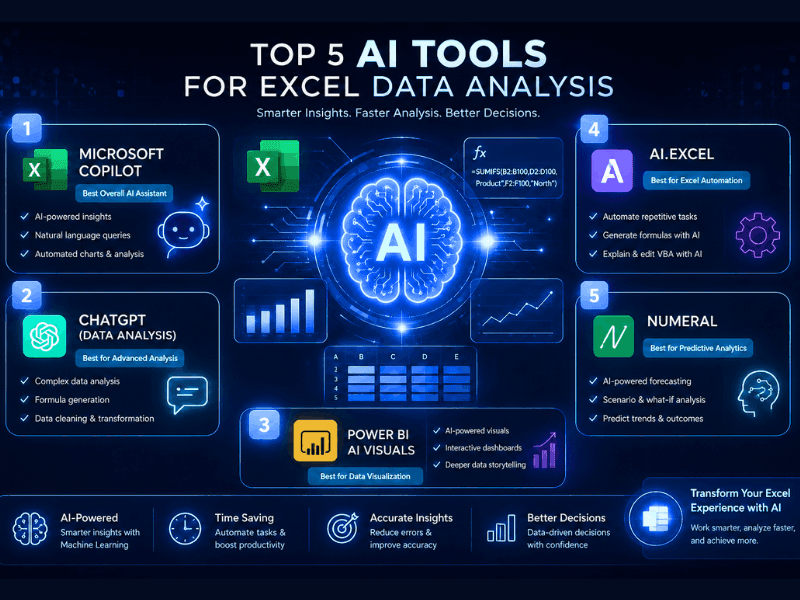
It is no longer an easy task to find the best spreadsheet assistant since there are new platforms coming up each month and offering similar functionalities.
In order to determine the list above, the following features were taken into account: formula generation, ability to clean data, creation of dashboards, user friendliness, reporting capabilities, and real-world applicability.
I also took time to test some of the programs with actual data from businesses instead of going by marketing rhetoric. There were a few programs that sounded good at their landing pages, but they did not perform well on spreadsheets.
The following programs caught my attention since they provided valuable results instantly without costing money for subscriptions.
If you’re searching for the Best Excel AI assistant 2026, these are currently the strongest options worth considering.
1. Formula Bot
Upon exploring the various automation tools available in spreadsheets, Formula Bot is among the most convenient to work with for new users.
The advantage of using Formula Bot for free Excel data analysis is that everything is very simple. One only needs to enter a natural language command to get formulas automatically generated.
During work with a sales report spreadsheet, I utilized it to develop lookup formulas that otherwise would take minutes to write from scratch.
If you wonder how you can create your own Excel formula using AI for free, Formula Bot helps you do this pretty easily.
Key Features
| Feature | Availability |
|---|
| Formula Generator | Yes |
| SQL Query Builder | Yes |
| Spreadsheet Explanations | Yes |
| Data Analysis Support | Yes |
| Google Sheets Support | Yes |
Free Plan: Fewer credits per month for formula creation and Excel spreadsheets.
Best For: Beginners, marketing professionals, businesspeople, and Excel spreadsheet formula creators.
Limitations: Analytics tools are not accessible on less expensive plans.
Advantages
- Quick to learn
- Formula creation is fast
- Works on several spreadsheets
Disadvantages
- Restrictions on monthly usage
- Few functions within the dashboard
What I found interesting is that it helped solve formula problems instantly without needing to have technical knowledge. It truly seems like an AI-powered Excel formula solver for no charge.
2. Julius AI
Using Julius AI is akin to having an actual data analyst sit by your side.
The application is designed to emphasize Julius AI data analysis from spreadsheets, thus making it ideal for users who work with huge amounts of data.
What I liked most about it was the conversational experience. Rather than spending time organizing data myself, all I needed to do was upload an Excel sheet and start asking questions.
If you want to use free AI software to interact with your Excel sheets, then Julius AI provides one of the best solutions out there.
During testing, I uploaded a customer database containing thousands of records. Within minutes, the system identified trends, created visualizations, and summarized important findings.

Key Features
| Feature | Availability |
| Natural Language Queries | Yes |
| Data Visualization | Yes |
| Statistical Analysis | Yes |
| Forecasting | Yes |
| Dashboard Creation | Yes |
Free Plan: Features some number of monthly data analysis attempts.
Best Suited For: Analysis professionals, researchers, consultants, and businesses.
Drawbacks: Paid plans may use up their quota fast when analyzing large documents.
Pros
- Fantastic analytic tools
- Great chart creation
- Deals well with large spreadsheets
Cons
- Steeper learning curve for novices
- More advanced functions need upgrade
When looking into how to analyze big data sets in Excel using AI, Julius AI would be one of the best options out there.
3. GPT for Work
The GPT for Work differs from other spreadsheets assistants due to its approach.
Unlike other spreadsheet assistants that require people to use a new platform, GPT for Work integrates with your favorite spreadsheet applications.
In my experience using the GPT for Work Excel add-in free trial, I was able to get some AI-assisted help without significantly altering my workflow.
It was interesting to see how much time I was saving by having all the formulas and summations created within one tab.
Key Features
| Feature | Availability |
| Excel Integration | Yes |
| Formula Generation | Yes |
| Content Creation | Yes |
| Data Summaries | Yes |
Free Trial: Offered to new customers.
Best For: Those already using most of their time within Excel.
Pros
- Seamless integration
- Productivity-oriented interface
- Good support for formulas
Cons
- No free options available
- Few premium capabilities locked
Among all the Free AI tools for Excel data analysis, GPT for Work feels closest to a native Excel assistant rather than a standalone platform.
4. Ajelix AI
The use of Ajelix is becoming common not because it creates formulas but because it emphasizes automation.
After reading various user testimonials about the software before trying it out, I became even more intrigued. Using it to work on financial documents helped me understand the reason behind that.
Ajelix AI Excel tool review 2026 trend keeps on rising due to the incorporation of spreadsheet intelligence with automated reports.
One of the key benefits is that you can use AI free in automating Excel sheets through natural language commands.
Key Features
| Feature | Availability |
| Formula Builder | Yes |
| VBA Generator | Yes |
| Dashboard Creation | Yes |
| Reporting Automation | Yes |
| Data Cleaning | Yes |
Free Plan: Comes with restricted daily requests.
Ideal Applications: Reporting for businesses, financial departments, dashboards, and workflow automation.
Advantages:
- Robust automation tools
- Integration with dashboards
- VBA coding abilities
Disadvantages:
- Technical nature of advanced operations
- Restricted daily usage
The other benefit is that Ajelix eliminates redundancy in spreadsheet usage while creating clear reports and structured business insight.
5. GPTExcel
Usability has been the key concern of GPTExcel, which makes the platform more interesting to use by beginners that seek quick solutions.
GPTExcel concentrates mostly on formula building, explanation of spreadsheets, chart building, and automation.
Initially using this tool, the interface seemed not too scary relative to many other similar solutions. Everything was made with simplicity in mind.
The GPTExcel free edition visualization tools worked pretty well for simple reporting tasks and charts.
Key Features
| Feature | Availability |
| Formula Generation | Yes |
| Chart Creation | Yes |
| SQL Queries | Yes |
| Spreadsheet Templates | Yes |
| Automation Support | Yes |
Restrictions of Free Version: There are limits to daily requests.
Best for: Students, freelance workers, and small business users.
Advantages
- Beginner-friendly interface
- Fast setup time
- Generation of helpful charts
Disadvantages
- Daily limit on usage
- Limited advanced analytics features
This Excel tool is ideal for users looking for a free AI formula generator tool without subscription services.
Feature Comparison Table
| Tool | Free Plan | Formula Generation | Data Cleaning | Dashboard Creation | Excel Integration | Ease of Use |
|---|
| Formula Bot | Yes | Excellent | Good | Moderate | Yes | Very Easy |
| Julius AI | Yes | Good | Excellent | Excellent | Yes | Easy |
| GPT for Work | Trial | Excellent | Moderate | Moderate | Excellent | Easy |
| Ajelix AI | Yes | Excellent | Good | Excellent | Yes | Moderate |
| GPTExcel | Yes | Excellent | Moderate | Good | Yes | Very E |
Recommendation
- Beginners → GPTExcel
- Analysts → Julius AI
- Small Businesses → Ajelix AI
- Formula Power Users → Formula Bot
- Excel Professionals → GPT for Work
After evaluating all five systems, one conclusion was clear: there isn’t a one-size-fits-all solution.
Those who are interested in data analysis should go with Julius AI. Formula-based processes will be best served by Formula Bot.
For business reporters, Ajelix might be a better choice; while for those working in spreadsheets, GPT for Work should work great.
The good news is that modern Free AI tools for Excel data analysis now cover almost every major spreadsheet challenge, from formula creation and workflow automation to dashboard building and predictive reporting.
In case you value visual reporting most, there are also some other tools from this list that can be called the best Free AI tools for Excel visualization – to make your spreadsheets useful business tools without deep IT skills.
Step-by-Step Guide: How to Analyze Data in Excel Using AI for Free
Most people believe that analyzing data with spreadsheets entails the use of some special Excel techniques. However, my experience has been entirely different thanks to the emergence of AI-assisted spreadsheet applications.
The question of How to analyze data in Excel using AI for free does not need to be complicated.
First, you should upload your Excel sheet into an AI platform. There are currently many tools that act as a Free AI tool to chat with Excel. This way, you can query your sheet with conversational language.
Rather than constructing formulas yourself, you can request summary, trend analysis, reports generation, and dashboard construction using simple prompts.
The most astonishing thing about testing was the speed with which these tools managed to turn raw data into insightful information for business purposes.
There are some new tools that also feature on the list of top Free AI tools for Excel charts.
Step 1: Cleaning Your Raw Data Instantly
Data cleaning is the most time-consuming step in spreadsheet analysis. Prior to any analysis, the data needs to be cleaned and prepared.
With today’s technology, there is a way to Clean messy data from Excel through the use of free AI tools that identify duplicates, standardize dates, and fix other mistakes.
For example, just recently, I had uploaded a list of clients with duplicates and missing information, and issues were immediately found.
On top of filling in blanks, this kind of technology can assist in establishing standardized ways of entering information and organizing columns.
Step 2: Generating Complex Formulas and Pivot Tables
The following action after dataset cleaning is all about calculations.
In cases where people want to learn how to make Excel formulas using AI free, all that they need to do is ask for what calculation they require, without necessarily making complicated formulas themselves.
This includes calculations such as calculating the growth in monthly revenue, client retention rates, or even profit margins.
It can also include the creation of Excel pivot tables using AI free by asking about the performance of sales in different regions, quarterly performance of products, and so forth.
In doing so, one greatly minimizes the effort spent on manually manipulating spreadsheets.
Step 3: Extracting Visual Charts and Insights
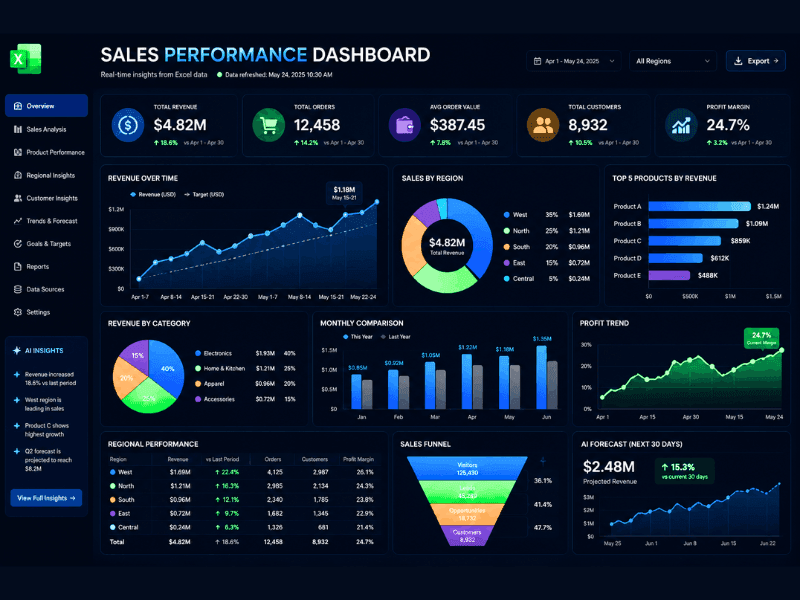
After the computations have been done, the visualization process will be much easier.
For example, by using the new Free Excel insights generator, we can turn number sequences into charts, dashboards, and other useful reports almost instantly.
I tested this tool by creating trend charts and regional comparison dashboards for marketing performance indicators.
A majority of the popular Free AI tools available for creating visuals in Excel are capable of detecting trends and anomalies, as well as displaying results in visual form.
The dashboards created by such tools make the understanding of large data sets easy.
Free AI Tools vs Paid Microsoft Copilot
Making the choice between a free spreadsheet assistant and Microsoft Copilot is mostly about your finances, work processes, and requirements regarding reports.
Upon my analysis of both programs, I realized that many freelancers and even small enterprises could complete most of their spreadsheets tasks using the free version.
| Comparison Factor | Free AI Spreadsheet Tools | Microsoft Copilot |
|---|---|---|
| Initial Investment | No upfront cost | Requires Microsoft 365 plan |
| Setup Process | Quick account signup | Microsoft ecosystem required |
| Ideal User Type | Beginners and independent professionals | Corporate users and large teams |
| Formula Assistance | Strong in most tools | Highly integrated within Excel |
| Conversational Analysis | Available in selected platforms | Built directly into Microsoft apps |
| Data Visualization Support | Available depending on the platform | Advanced visualization capabilities |
| Workflow Automation | Good for common tasks | Extensive automation options |
| Collaboration Features | Limited on free plans | Enterprise-grade collaboration |
| Scalability | Suitable for personal and small projects | Designed for large-scale operations |
| Long-Term Value | Excellent for budget-conscious users | Better for organizations with complex workflows |
| Flexibility | Multiple tools with different strengths | Primarily tied to Microsoft products |
| Recommended Choice | Freelancers, students, startups | Enterprises and established companies |
If your primary goal is formula generation, spreadsheet automation, and reporting, many free AI tools for Excel data analysis deliver impressive value without additional costs.
Those seeking a Free AI alternative to Microsoft Copilot within Excel typically opt for Julius AI, Formula Bot, Ajelix AI, or GPTExcel because they encompass all essential needs for day-to-day work within Excel spreadsheets.
Microsoft Copilot becomes more appealing to organizations that have invested in the Microsoft environment and need enterprise-level integrations.
Free services would be enough for personal users, freelancers, and startup companies. Organizations involved in extensive reporting and collaboration might find Copilot’s enhanced Microsoft 365 integration helpful.
My response to the request for the Best Excel AI assistant 2026 will be determined by the person’s requirements rather than by any one product itself. Free tools provide good value, and Copilot is best suited for business settings.
Real-World Use Cases
It is only when we look at the practical implementation that the real benefits of spreadsheet automation come to light. In my observations, it has become apparent that using Free AI tools for Excel data analysis solves problems that people from different fields face.
For Students
Students can perform analysis of their survey responses, sort out research data, create graphs, and write reports without mastering complex spreadsheet operations.
For Small Businesses
Small business owners use artificial intelligence-powered reporting software for keeping records of their sales performance, inventory details, expenditures, and recognizing patterns in their revenues.
For Data Analysts
The analysts rely on the use of spreadsheet intelligence systems during the process of their data preparation, analysis, future projections, and dashboard construction for better decision-making.
For Freelancers
Many freelancers turn to AI workflow automation to help them prepare client reports, monitor their finances, follow their leads, and create spreadsheets faster.
Spreadsheet intelligence helps people perform their tasks more efficiently and with reduced manual intervention.
Common Mistakes to Avoid When Using AI for Excel Analysis
AI has the potential to save countless hours, but AI technology isn’t flawless. In testing out several Free AI tools for Excel data analysis, I discovered that people tend to commit some of the same errors.
Are AI-Generated Formulas Always Correct?
Nah, not always. Sometimes AI-based formulas may misinterpret the columns that need to be referred or calculations to be done. So, my advice would always be to validate the results before applying them for any finance-related purposes.
It’s better to be safe than sorry!
Can AI Replace Excel Expertise?
No. AI can make working on spreadsheets easy, but having basic knowledge about Excel is important. Those who understand formula, pivot table, and data structure have more success in doing tasks.
AI should be treated as an assistant, not a substitute.
Should Sensitive Business Data Be Uploaded?
That may be the most ignored point. Before uploading any information from customers, financials, or internal reports, study the policies related to privacy and security of your platform first.
Not all file processing software uses cloud computing. Some might not meet the needs of an individual company.
The best solution would be easy. Employ AI to work fast while leaving room for human judgment for accuracy and decisions.

Conclusion & Final Recommendation
The field of spreadsheets is changing rapidly, with AI being implemented in reality rather than as a futuristic idea. Through my experimentation with various systems, it is clear that the primary benefit is not only related to automation.
The main benefit lies in having more time to analyze the information rather than spending time processing the data.
The Free AI tools for Excel data analysis today provide the user with an opportunity to make formulas, arrange datasets, design dashboards, compile reports, and identify trends without any special knowledge of spreadsheet management.
For beginners, GPTExcel and Formula Bot would be the most convenient platforms because their interface is easy to navigate through.
Those who have to deal with complicated reports and vast data sets may appreciate the strong analytical features provided by Julius AI.
However, owners of small businesses may prefer Ajelix AI when they need some workflow automation and reporting assistance.
There’s no such thing as the Best Excel AI assistant 2026. There isn’t only one that will suit everyone – there are many different tools available to try depending on your needs.
Here is my advice. Just choose any tool from this list, put up your own Excel sheet, and try it out yourself.
The quicker you start playing around with automated Excel sheets, the sooner you’ll find how useful they are.
FAQs
1. Are These AI Excel Tools Safe for Sensitive Company Data?
Reputable spreadsheet intelligence services generally encrypt all uploaded documents with security protocols.
Nevertheless, it is important to note that one must read the privacy policy of an AI reporting tool or data analytics software before using it.
In case of extremely sensitive business data, it may be prudent to rely on enterprise-level solutions.
2. Can I Create Advanced Macros Using Free AI Tools?
Yes. Many tools have been developed to automate VLOOKUP and macros in Excel using free AI. They do this by creating VBA scripts and other automation tasks simply with a few instructions.
These include software like Ajelix AI and GPTExcel, which enable users to easily generate automation tasks and functions.
3. Which Free AI Tool Is Best for Beginners?
Beginners will likely find GPTExcel and Formula Bot the most user-friendly products. They have easy-to-use interfaces and emphasize formula generation, spreadsheet support, and increased productivity.
Beginners will easily pick up data organization, reporting, and formula creation skills without being confused by analytical functions.
4. Can AI Generate Pivot Tables Automatically?
Yes. Many AI Spreadsheet Assistants have the capability to create Pivot Tables using only natural language commands. One only needs to describe what kind of report one requires, and the software generates summary tables automatically.
This application is very beneficial for business reporting, sales analysis, customer segmentation, and other no-code data analysis initiatives.
4. What Is the Best Free Alternative to Microsoft Copilot in Excel?
Julius AI is generally regarded as the most powerful free option for Microsoft Copilot in Excel due to the conversational analysis and reporting features it offers.
Formula Bot, Ajelix AI, and GPTExcel are also outstanding alternatives depending on whether you require formula creation, dashboard building, or even spreadsheet automation.
5. Can AI Analyze Large Excel Datasets?
Yes, definitely. Platforms like Julius AI can easily process massive spreadsheet files efficiently.
They have the ability to detect any patterns, extract intelligent insights from the spread sheets, create charts, predict the future, and detect trends which may be difficult to discover manually through spreadsheet analysis.
6 thoughts on “Top 5 Free AI Tools for Excel Data Analysis in 2026 (Step-by-Step)”