
Overview— Why Great Resumes Still Fail in 2026
I still remember the message a candidate sent me last year: “I’ve applied to 140 jobs. Zero callbacks. My resume is good, I promise.”
He was right. His resume was good. It just wasn’t built for the system reading it first.
That system is the AI resume scanner — and in 2026, it’s the real gatekeeper between your application and a human recruiter’s inbox. Interviews are harder to land now, not because there are fewer jobs, but because there’s more automation standing between you and the hiring manager.
Every large company today runs some form of ATS resume scanner, and most of them have quietly upgraded to LLM resume screening — systems that read resumes more like a person than a keyword filter. That’s a big shift. It means old “tricks” don’t work the same way anymore, and new ones do.
In my experience reviewing resumes for job seekers across tech, finance, and marketing, the pattern is almost always the same: talented people get filtered out for reasons that have nothing to do with their actual skill.
This guide breaks down exactly how these scanners work, why so many strong resumes fail, and what you need to do to consistently hit a 75+ match score — the number recruiters actually pay attention to.
By the end, you’ll know how to pass AI resume screening without guessing, gaming, or stuffing your resume with keywords that backfire.
Why Fortune 500 Companies Trust AI Hiring Systems
Large companies receive thousands of applications per role. A single recruiter simply cannot read them all manually.
After testing multiple ATS systems used by mid-size and large employers, I noticed a consistent reason companies adopt AI screening: consistency.
Human reviewers get tired, biased, or inconsistent by the 200th resume. AI tools apply the same scoring logic every time, which — when configured well — speeds up shortlisting without sacrificing quality.
What is an AI Resume Scanner and How Does it Work in 2026?
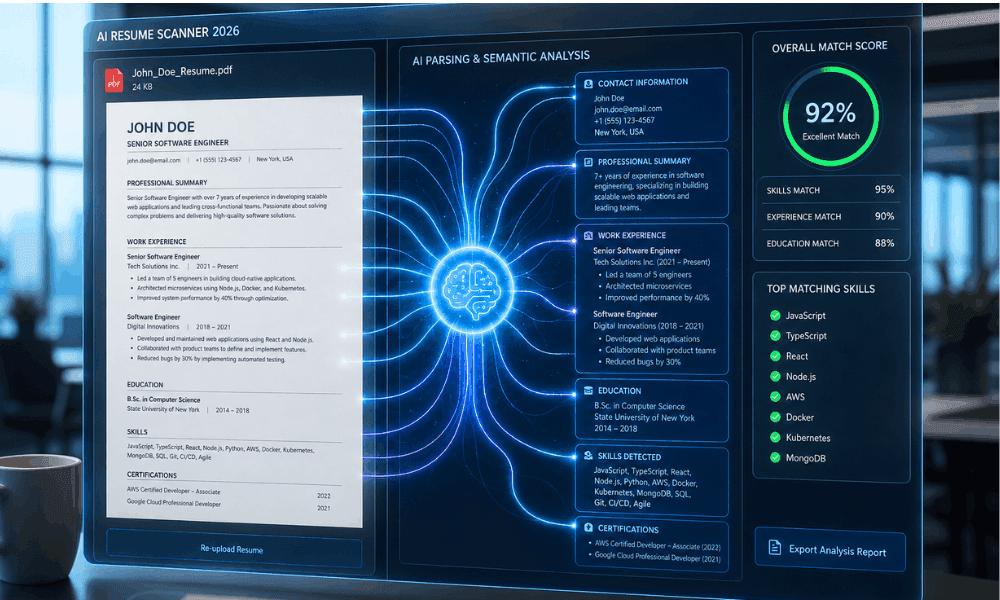
An AI resume scanner is software that reads, parses, and scores your resume against a job description before a human ever sees it. Think of it as a very fast, very literal first-round interviewer.
Here’s what actually happens behind the scenes when you hit “Submit”:
- Extraction — The scanner pulls raw text from your resume file (PDF, DOCX, etc.).
- Parsing — It sorts that text into fields: name, job titles, dates, skills, education.
- Context understanding — It reads around keywords to understand what you actually did.
- Experience scoring — It weighs how long and how deeply you’ve used a skill.
- Skills analysis — It compares your skill set against what the job description asks for.
The part most people don’t realize is step 3. Older systems just searched for exact words. Today’s AI-driven hiring tools try to understand meaning — this is where things get interesting.
The Shift from Traditional ATS to LLM Resume Screening
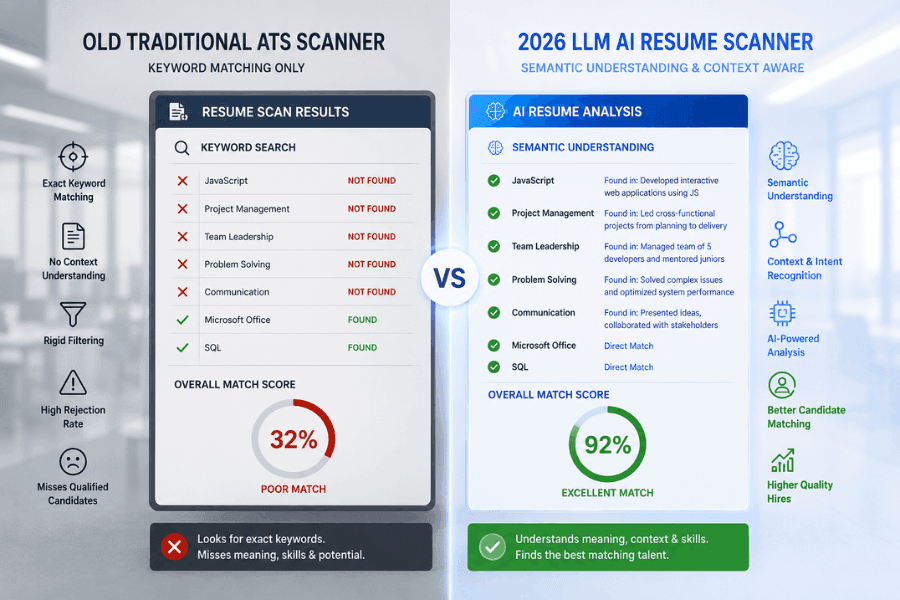
Old-school ATS software worked like a basic search engine. If your resume said “wrote reports” instead of “reporting,” and the job description asked for “reporting,” you could lose points — even though you clearly had the skill.
LLM resume screening changed this. Large language models can understand that “wrote reports,” “prepared reporting,” and “reporting experience” all mean roughly the same thing.
When I worked with job seekers switching industries, this shift was actually good news for them — the system finally started giving credit for transferable experience instead of penalizing different wording.
That said, it’s not perfect. A resume parsing error can still happen if your formatting confuses the extraction step, no matter how smart the language model behind it is.
How Semantic Matching Changed Hiring
Semantic Keyword Matching is the technical term for what I described above — matching by meaning, not just spelling.
One issue I frequently noticed while auditing resumes: candidates would list a skill once, in isolation, with no context.
A scanner using semantic matching actually rewards you for showing how you used a skill, not just naming it.
For example, “Managed budgets” scores lower than “Managed a $2M marketing budget across three product lines” — same skill, very different signal.
Why Most Job Seekers Fail to Hit Resume Match Score 75
A Resume Match Score 75 has become an unofficial benchmark in the hiring world. Below it, your resume often doesn’t reach a recruiter’s screen at all.
After running dozens of resumes through different checkers, I found the failure points were rarely about a person’s actual qualifications. They were almost always about presentation:
- Job titles that don’t match industry-standard language.
- Skills mentioned once but never demonstrated with results.
- Resumes written for one role, then reused for a completely different one.
- Missing hard skills the job description explicitly lists.
Optimize resume for AI screening doesn’t mean lying about your experience. It means describing your real experience in language the system — and the human after it — can actually recognize.
What Recruiters Usually Set as Their Minimum Score
In my experience working alongside hiring teams, most set their cutoff between 65 and 80, depending on how competitive the role is.
For high-volume roles like customer support, the bar might sit lower. For specialized tech or finance roles, I’ve seen recruiters set it at 80+ simply because the applicant pool is that deep.
Why 75+ Score Increases Interview Chances
A resume scoring 75 or higher signals skills-based shortlisting eligibility — meaning the system considers you a strong enough match to pass to a human.
It doesn’t guarantee an interview, but it gets you in the room. Below that threshold, your resume is often filtered before anyone reads a single line.
Old ATS vs 2026 AI Resume Scanner
| What It Looks At | Traditional ATS (Pre-2023 style) | 2026 AI Resume Scanner |
|---|---|---|
| How it reads your resume | Looks for the exact words listed in the job post — no match, no credit | Understands meaning, so “led a team” still counts even if the job post says “managed staff” |
| Repeating your target keyword | Often helped you rank higher, so people stuffed resumes with repeated terms | Flags unnatural repetition and can quietly lower your score instead |
| Resume design & layout | Mostly ignored design — as long as text existed somewhere, it was fine | Can misread multi-column layouts, icons, or text boxes, and skip that content entirely |
| How candidates get shortlisted | Fixed rules — match X keywords, pass; miss them, fail | Ranks candidates by actual skill relevance, not just keyword count |
| Reviewing your experience | Checked if a skill was mentioned, nothing more | Looks at how long and how deeply you’ve actually used that skill |
5 Critical Mistakes That Cause Resume Parsing Errors
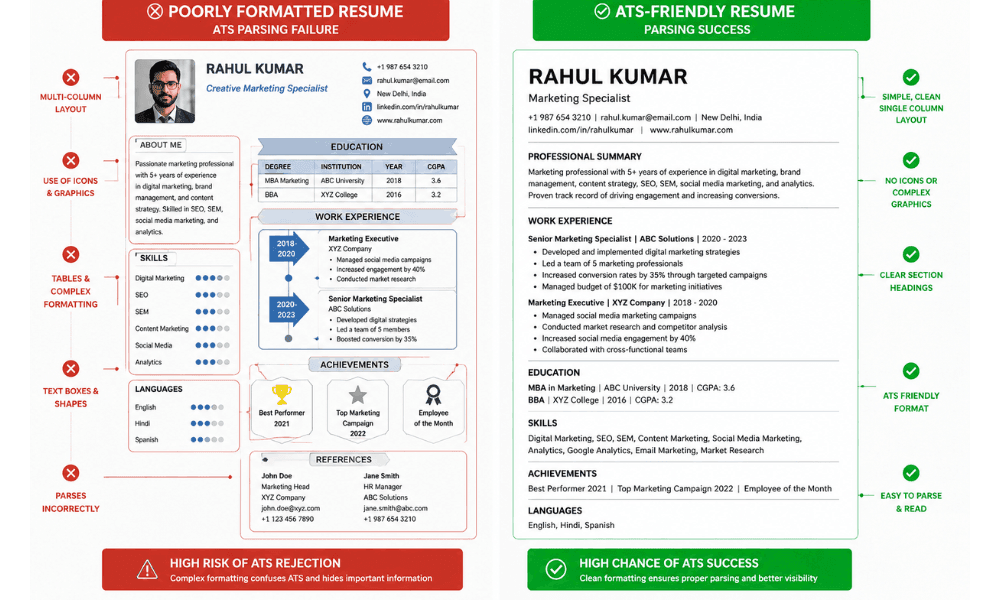
This is the part I see go wrong most often, and it’s almost always fixable in an afternoon. A resume parsing error happens when the software can’t correctly read the content of your file — not because you lack skills, but because your layout confuses the extraction engine.
The five biggest culprits I’ve come across:
- Multi-column layouts — Scanners often read left-to-right across the whole page, scrambling a two-column resume into nonsense
- Icons and graphics — Pretty, but often invisible or misread by parsing engines.
- Tables inside resumes — Content inside table cells can get skipped entirely.
- Text boxes — Many parsers can’t extract text placed inside a floating text box at all.
- Image-based resumes — If your resume is essentially a picture, most scanners can’t read it as text.
I also want to flag resume keyword stuffing penalties. A candidate once asked me to review a resume where “Python” appeared 14 times in a white font matching the background.
Modern scanners flag this pattern instantly, and it can actively lower your score instead of raising it. How to beat ATS resume scanner systems isn’t about tricking them — it’s about writing clean, honest, well-structured content they can actually parse.
Why Single Column Resumes Win in 2026
Single-column resumes remain the safest choice because every parser, old or new, reads them the same predictable way: top to bottom.
After testing dozens of resume formats through different checkers, single-column, plain-section layouts consistently scored higher purely on readability — before we even touched the content itself.
Why Canva Templates Often Fail ATS
I love Canva for a lot of things, but resumes aren’t one of them. Many Canva templates use design elements — icons, colored blocks, decorative dividers — built with graphic layers rather than readable text.
When I ran several popular Canva resume templates through free checkers, more than half had missing or scrambled sections purely because of the underlying design structure.
Top 5 Free AI Resume Scanners to Test Your CV
Before you apply anywhere, run your resume through a checker first. Here are the tools I’ve personally tested and recommend to candidates.
Jobscan Review
Jobscan is the closest thing to an industry standard for ATS resume scanner checks. Paste in a job description alongside your resume, and it shows a detailed match report, including missing hard skills and formatting warnings. It’s especially useful when you’re tailoring one resume for multiple similar job postings.
Resume Worded Review
Resume Worded focuses more on writing quality — bullet point strength, action verbs, and quantified results. I like using it as a second pass after Jobscan, since it catches weak phrasing that a pure keyword tool might miss.
Teal AI Review
Teal is less of a “checker” and more of a full resume builder with tailoring built in. It’s a solid AI Resume Checker Free option if you want to build and optimize in one place instead of switching between tools.
Rezi Review
Rezi leans heavily into ATS-safe templates, so it’s a good starting point if your current resume has formatting issues from a Canva or Word template. Its scoring system nudges you toward stronger phrasing in real time as you type.
Additional Tool Recommendation
Beyond the four above, it’s worth spot-checking with more than one tool before you finalize anything. Different scanners weigh formatting and keywords slightly differently, and comparing two or three reports gives you a more reliable picture than trusting a single score.
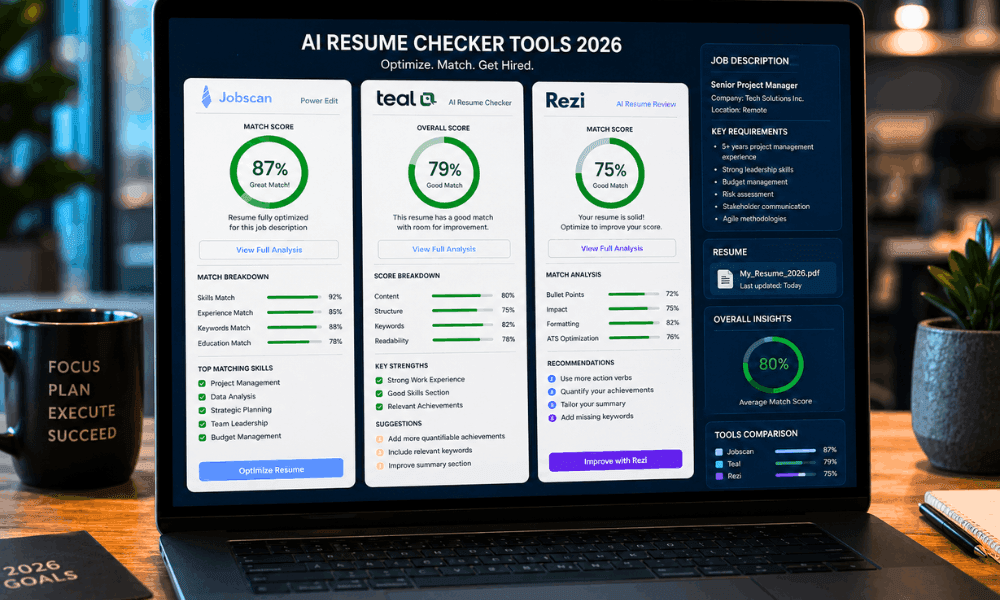
Best Free AI Resume Checkers Comparison
| Tool | Best Used For | Free Limit | Key Feature |
|---|---|---|---|
| Jobscan | JD Matching | 5 scans | ATS Report |
| Resume Worded | CV Improvement | Free Score | Bullet Analysis |
| Teal AI | Resume Building | Generous | Resume Tailoring |
| Rezi | Resume Creation | One Resume | ATS Templates |
How HR Leaders Use AI for Hiring in 2026
On the other side of the process, recruiters are leaning on tools like Greenhouse AI screening software to manage volume.
These are AI-driven hiring tools built to rank, sort, and surface the strongest candidates from a stack of hundreds of applications — part of a broader wave of Top AI Resume Screening Software now standard at mid-size and large companies.
How Recruiters Save Time Using AI
When I worked with hiring teams evaluating new screening software, the time savings were the first thing they noticed.
What used to take a recruiter two full days of manual resume review could be narrowed down to a shortlist in a few hours, with the AI flagging top matches and clear mismatches upfront.
Why Human Recruiters Still Matter
And here’s one thing to remember: No machine is responsible for making the final hiring decision. In all hiring decisions that I have seen being made so far, there always remains that one element of having a human review the list and look for any potential problems that the AI could have missed.
Final Checklist Before You Apply
Before you hit submit, run through this quickly:
- Skills matching — Every major required skill appears with real context, not just a list.
- File format — Save as .docx or a text-based PDF, never an image.
- Resume length — One page for under 10 years of experience, two max otherwise.
- Keywords — Match the exact hard skills listed in the job description.
- Formatting — Single column, no tables, no text boxes, no icons.
- Score target — Aim for a Resume Match Score 75 or higher before applying.
- Sections — Clear headings: Experience, Skills, Education, Summary.
- Readability — Short bullet points, no dense paragraphs.
Conclusion
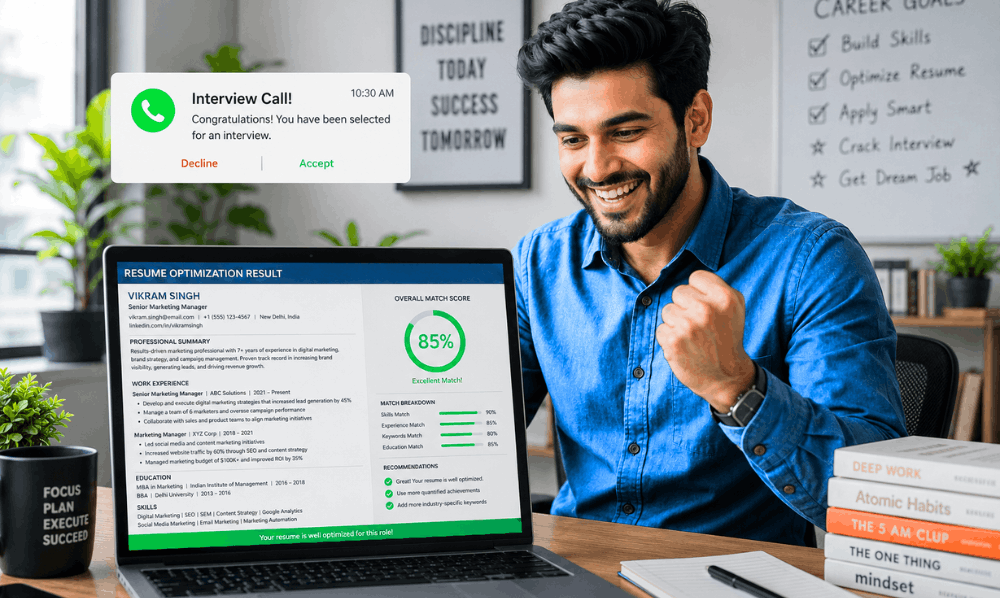
I’ll be honest with you.
The first time a candidate showed me her resume score was 42, I thought the tool was broken.
It wasn’t. Her resume was well-written, but it just wasn’t built the way an AI Resume Scanner actually reads a page.
That’s the real lesson here.
You don’t need a fancier resume. You need one that speaks the same language as the system reading it first.
So here’s what to actually do next.
Go back, clean up your formatting, drop the graphics-heavy layout, and switch to one of the ATS-friendly resume templates 2026 recruiters already trust.
Rewrite two or three weak bullet points with real numbers attached.
Run it through a free checker before you touch “Apply.”
That one extra step takes ten minutes. It’s saved more interviews than any cover letter I’ve ever helped write.
Your experience is already good enough. The only job left is making sure the AI Resume Scanner can actually see it clearly.
So don’t submit blindly.
Test your resume first, fix what it flags, and then apply — with a score that finally matches the work you’ve put in.
Frequently Asked Questions
1. Can AI Reject My Resume Automatically?
In most modern systems, AI doesn’t outright reject you — it ranks and scores you, and a low score just means you’re less likely to reach a human reviewer. Some companies do set automatic cutoffs, though, so a very low match score can function like a rejection in practice.
2. What Is a Good Resume Match Score?
As a rule, any resume match score 75 and up is good. Anything 85 and over is great, whereas anything below 60 typically means there are some considerable differences between your resume and the job description.
3. Are Canva Resumes ATS Friendly?
Not always. Many Canva templates use graphic-heavy layouts that confuse parsing engines. If you want to use Canva, stick to simple, single-column templates without icons, text boxes, or tables.
4. Is Keyword Stuffing Still Effective?
No — and in 2026 it can actively hurt you. Scanners are built to detect unnatural keyword repetition, and resume keyword stuffing penalties can lower your score instead of raising it.
5. Which Free ATS Checker Is Best?
It depends on your goal. Jobscan is strong for job-description matching, Resume Worded is better for writing quality, and Teal is useful if you also want help building the resume itself.
6. Can AI Understand Work Experience Gaps?
Modern LLM resume screening tools are generally better at reading context around gaps than older systems were, but they still can’t read your mind. A short, honest note in your resume or cover letter explaining a gap is more reliable than hoping the AI infers the right story.
1 thought on “How AI Resume Scanners Work in 2026 (And How to Get a 75+ Match Score)”